



MVP Web Development: A Step-by-Step Guide for 2026.
Step-by-step MVP Web Development for UK startups: discovery, features, tech stack, prototyping, testing and launch.
MVP Web Development: A Step-by-Step Guide for 2026.
The most popular advice on MVP web development is also the most damaging. Build something small, launch it quickly and add the serious work later. That sounds lean, but it usually produces a cut-down version of the final product, not a test of whether anyone wants it.
A web MVP isn't a smaller website. It's an evidence milestone. It exists to answer one specific question about demand, behaviour or willingness to pay, and that answer should guide your next build, funding or stop decision. If you can't state the question in one sentence, you don't have an MVP scope yet. You have a feature list.
The market won't wait while you guess. The government's UK Business Data Survey 2026 found that 78% of businesses reported having a website in 2025 to 2026, up from 68% in 2023 to 2024. Presence alone no longer differentiates you. What matters is whether real users can complete a valuable journey, on mobile, without friction, and whether you can measure that completion from day one.
Key Takeaways
- Answer one question first: Define the specific demand, behaviour or payment question your MVP must answer, and cut every feature that doesn't help you answer it.
- Follow the sequence: Work through discovery, prototype, test, private beta and only then public launch. Don't start production engineering before you've tested the riskiest journey.
- Prioritise by risk, not requests: Choose features because they test a customer, commercial or technical assumption. Popular requests that test nothing can wait.
- Build for the next eighteen months: Pick a well-supported stack your team can change quickly. Don't architect for an imagined final platform you haven't validated.
- Treat accessibility and privacy as launch criteria: Check keyboard access, labels, contrast and data minimisation before release, not during a later tidy-up phase.
- Agree thresholds in advance: Set measurable targets for completion, errors, latency, drop-off and support volume before beta users arrive, so results aren't open to interpretation.
- End with a written gate: Record a go or no-go decision against a fixed scope before you fund the next stage. The full sequence is set out in the process below.
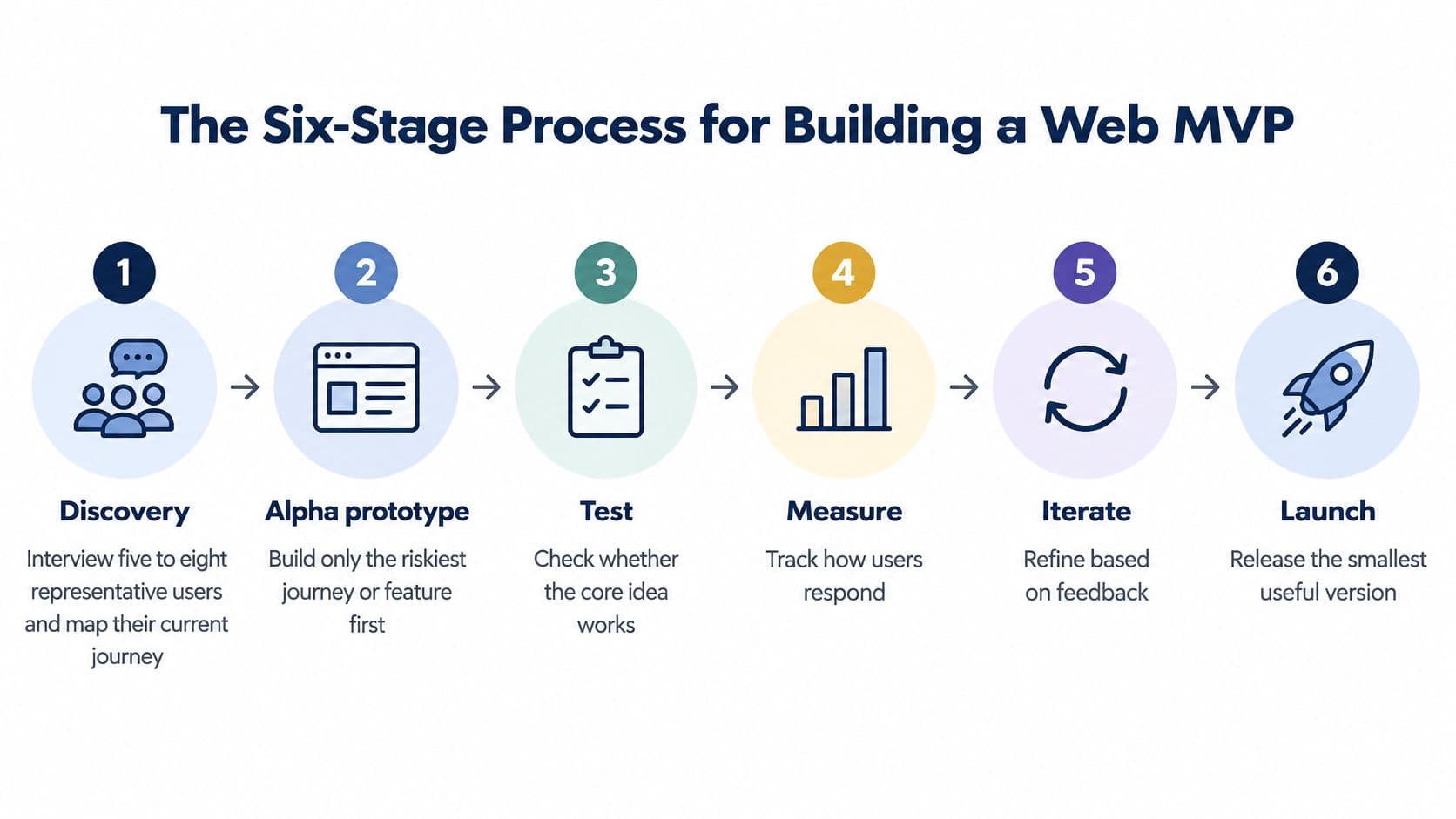
The Six-Stage Process for Building a Web MVP
Many teams start at stage four. They brief developers, debate page layouts and treat user testing as a final check. I'd reverse that order. You should spend your cheapest weeks testing the proposition, and your expensive weeks building only what survived testing.
Stage 1 Discovery
Interview five to eight representative users and map how they solve the problem today. Ask what they tried last time, where they got stuck and what workaround they paid for. Don't ask what features they'd like. People predict their future behaviour badly, but they describe past frustration accurately.
Write down goals, constraints, measurable outcomes and assumptions in one document. Convert the findings into prioritised hypotheses, such as "letting agents will book a viewing online if they don't have to phone during working hours". That sentence becomes your design target. Our own web development work starts with a discovery call, where we learn the client's goals, assess their current setup if they have one, and recommend a fresh build, technical audit or strategic redesign. You can see how that sequencing fits a longer plan in our web development roadmap.
Stage 2 Alpha Prototype
Prototype only the riskiest journey or integration. The GOV.UK guidance on how the alpha phase works states that Alpha is typically 6 to 8 weeks and should produce prototypes complex enough to test ideas, but not production-quality code. That's the right instinct for commercial products too. A clickable prototype you can throw away beats polished code built on an untested guess.
Pick the cheapest method that answers your question:
- Clickable prototype: Use Figma for multi-step journeys where navigation, sequencing and form order are the unknowns.
- Paper sketch tests: Use rough screens for early navigation questions, before visual design distracts people from structure.
- Wizard of Oz test: Let users interact with a real front end while a person does the back-end work by hand, such as matching requests manually.
- Landing page: Publish one page with a sign-up or pre-order button to test interest before any product exists.
Say you're testing a booking service. A Wizard of Oz version lets a customer pick a Saturday slot while your team confirms availability by email. You've tested demand and the journey without building calendar synchronisation. If nobody books, you've saved months.
Stage 3 Test With Real Tasks
Test with five users per round, across two or three rounds. Write tasks as goals, not instructions. "Book a viewing for Saturday" works. "Click the blue button to continue" teaches you nothing. Never ask whether people like the design. Politeness will poison your data.
Record task success, errors, time on task and the exact words people use when they're confused. Their wording often becomes better label and heading copy than anything your team invents. Set the rule in advance: if fewer than four of five users complete the core task, rework the journey before any build begins.
Practical rule: A prototype task that needs the facilitator to rescue it has failed, even if the user eventually finishes. Count the rescue, not just the result.
Many teams cut corners here because testing feels slow. It isn't. Reworking a Figma screen takes an afternoon. Reworking a built checkout takes a sprint, plus regression testing, plus an argument about sunk cost. For a useful comparison of sequencing approaches, this step-by-step MVP development guide from Chicago Brandstarters covers similar ground from a startup angle.
Stage 4 Define the Backlog From Evidence
Build your MVP backlog only from validated needs, and attach the user quotes to each item. If a feature has no quote, no observed failure and no hypothesis behind it, it doesn't belong in the first release. That discipline protects you when a senior stakeholder asks for their favourite feature in week six. You can point to evidence rather than trading opinions.
Our web development covers planning and design, frontend build, backend development and post-launch support. That order matters. Planning and design aren't decoration before development begins. They're where scope gets decided while changes are still cheap. Work like our Cultaholic web project shows how much easier delivery becomes when audience behaviour shapes the build rather than trailing behind it.
Stage 5 Private Beta
Release to a limited, named group first. Fix defects, check scalability under realistic load and monitor your success metrics before anyone else arrives. Small numbers are a feature here. Twenty committed beta users who attempt the core journey teach you more than two thousand casual visitors who bounce from the homepage.
Give beta users one clear feedback route and respond visibly. Log every defect against the journey it blocked, not the page it appeared on. A payment error is a revenue problem. A misaligned image is not, whatever it looks like in a screenshot.
Stage 6 Public Launch
Launch publicly only with analytics live from day one, covering entry, completion, abandonment and error on the core journey. A launch without instrumentation is just an opinion with a domain name. Decide in advance which numbers you'll review weekly and who owns acting on them.
The common pitfall across all six stages is overbuilding low-risk features while the core proposition goes untested. Teams polish account settings before proving anyone wants an account. Finish each stage with a written go or no-go decision, recorded before the next stage starts. That single habit stops momentum replacing evidence.
Prioritising Features Without Overbuilding
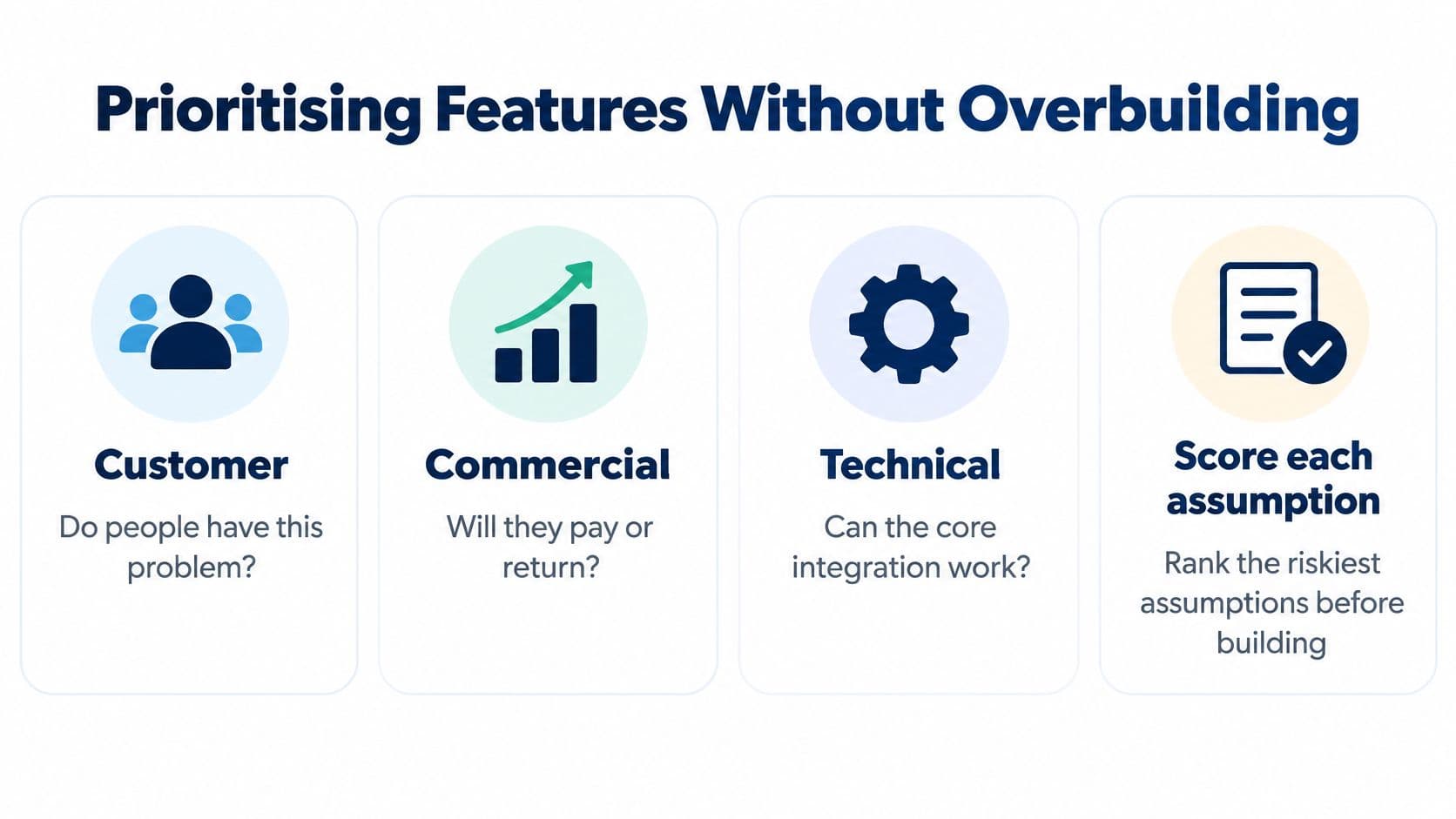
Start by listing your riskiest assumptions in three groups. Customer assumptions ask whether people have this problem. Commercial assumptions ask whether they'll pay, return or refer. Technical assumptions ask whether the core integration, data source or business rule can work at all. Most feature lists mix these together, so everything looks equally urgent. It isn't.
Scoring Each Feature
Ask three questions of every proposed feature. Does it test one of those assumptions? Is it needed to complete the core journey end to end? Could a manual workaround, such as a spreadsheet, a shared inbox or a concierge service, stand in for the first thirty days? A feature that fails all three questions is not an MVP feature, whatever its fans say.
Sort the results into Must, Should, Later and Never. Must means the core journey breaks without it. Should means it improves completion but has a workaround. Later means validated but not urgent. Never is the category teams avoid, and it's the most valuable one, because it ends recurring debates.
Say a trades business wants an online booking site. Online payment is a Must only if taking money upfront is the behaviour being tested. If the question is whether customers will book without phoning, a confirmation email and payment on completion will do. The customer dashboard goes to Later. Admin reports run from a spreadsheet export. You've just removed weeks of build without weakening the test.
Evidence Milestones Beat Feature Count
Funding stage changes what your MVP must prove. The HSBC Innovation Banking 2025 UK Innovation Review reports that UK startups raised approximately $23.6 billion in venture capital in 2025, up 35% from 2024. Money exists, but it follows evidence. Investors don't fund feature counts. They fund activation, retention and willingness to pay, measured against thresholds you set before launch.
Write your invest, pivot or stop thresholds down before beta starts. Thresholds invented after results arrive always flatter the results.
A bootstrapped SME may optimise for revenue and operational efficiency, so its MVP should prove that the product saves staff time or converts enquiries. An investor-backed AI start-up may need reproducible evaluation, data governance and a credible route to scale from the start, even though users never see those capabilities. Neither is wrong. The mistake is copying another company's MVP scope when your next decision is completely different.
Accessibility and Privacy From the First Release
Accessibility and privacy belong in the first release because an MVP is an evidence milestone. If your test excludes people who use assistive technology, or collects data you do not need, the results cannot give you a sound basis for the next build or funding decision. Addressing these needs early also avoids reworking interfaces and data flows after launch.
Start with accessible interactions, not a final polish pass. Use semantic HTML for headings, lists, buttons and landmarks. Make every action work by keyboard in a logical order, show a visible focus state, and give every form input a persistent programmatic label. Check that text remains readable at small sizes and high zoom, with sufficient colour contrast and responsive layouts.
Your Baseline Checklist
- Semantic HTML: Use real headings, lists, buttons and landmarks rather than styling generic elements to imitate them.
- Keyboard-operable flows: Make every action available without a mouse, in a logical sequence.
- Visible focus states: Keep the user's current position clear as they move through the page.
- Labelled form controls: Give each input a persistent, programmatic label. Placeholder text alone is not enough.
- Sufficient colour contrast and responsive layouts: Keep text readable at small sizes and high zoom.
Run automated checks with axe or Lighthouse, then test with a keyboard and a screen reader such as VoiceOver or NVDA. Automated tools can flag missing labels and contrast failures, but they cannot judge whether an error message is clear or whether a modal traps focus. The inclusive design principles guide offers a broader framework for these decisions. Arch's Edinburgh Council web work is an example of public-facing web development.
For a public-sector product, check the applicable accessibility requirements and publish an accessibility statement. The GOV.UK guidance on accessibility requirements for public sector websites and apps sets out the requirements, including the relevant WCAG standard. Schedule an audit before limited release and repeat it before wider launch. Treat unresolved accessibility failures as a launch decision, not a report to file away.
Privacy by Design
Apply the same discipline to personal data. The ICO guidance on data protection by design and by default explains that UK GDPR Article 25(2) requires organisations, by default, to use only the personal information necessary for a specific purpose. Map each form field to that purpose. Remove any field without one.
Set retention periods and access rules before implementation. If you decide later that a field is unnecessary, removing it can mean changing the form, database and user expectations together. Keep analytics equally focused: define what evidence the MVP needs, collect only the data that supports that decision, and make privacy part of the release criteria.
Choosing a Tech Stack You Will Not Outgrow
Stack debates usually start with fashion and end with regret. I'd start with six criteria instead. What skills does your team have, or can you hire for locally? How fast can a working version ship? How often do non-technical staff need to edit content? Which integrations are essential, such as payments, CRM and analytics? What's the realistic path to scale, not the fantasy one? And how expensive is a change later if you choose wrong?
Matching Stack to Product Type
A content-led marketing site suits WordPress or a headless CMS such as Strapi or PayloadCMS paired with a React or Next.js front end. Editors can publish without developer help, which removes the bottleneck that kills most content plans. We build with exactly those options, including React, Next.js, WordPress and headless CMS solutions, chosen per project rather than by habit.
A custom web application or customer portal suits a React front end with a Laravel or PHP back end. That combination handles logins, structured data and business rules cleanly, and there's a deep hiring pool for it. Our H2OiQ web project is an example of data-driven web work where the back end carries as much weight as the interface. If you're structuring a React or Next.js build, this overview of codebase organization for React product teams from ogBlocks is a sensible starting reference.
A SaaS product needs authentication, billing and multi-user access from the start. Those aren't features you bolt on later without pain, because they shape your data model. Plan them early, even if the first release has one pricing tier and manual invoicing behind the scenes. Our scalable system design guide covers how early structural decisions affect later growth.
A Worked Example
Say a founder needs a thirty-page marketing site plus a members-only area. Forcing both into one tool usually means compromising both. I'd use a headless CMS for the content, so the marketing team can publish freely, and a separate React application for the portal, where logins and member data live. Each part uses the tool built for its job.
Don't build for ten million users when your MVP needs to prove a hundred. Premature scale is just expensive guessing.
The rule of thumb is simple. Pick the well-supported option your team can change within a week. If a routine change needs a specialist contractor and a three-week wait, that stack will slow every iteration your MVP evidence demands. Timeline follows scope, not page count. A functional web MVP typically takes eight to sixteen weeks, and custom web applications usually run three to six months. The main cost drivers are integrations, user roles and custom business logic. Agree a fixed scope before you choose the stack, or the stack conversation will expand the scope for you.
Set Your Launch Gate and Choose Your Next Step
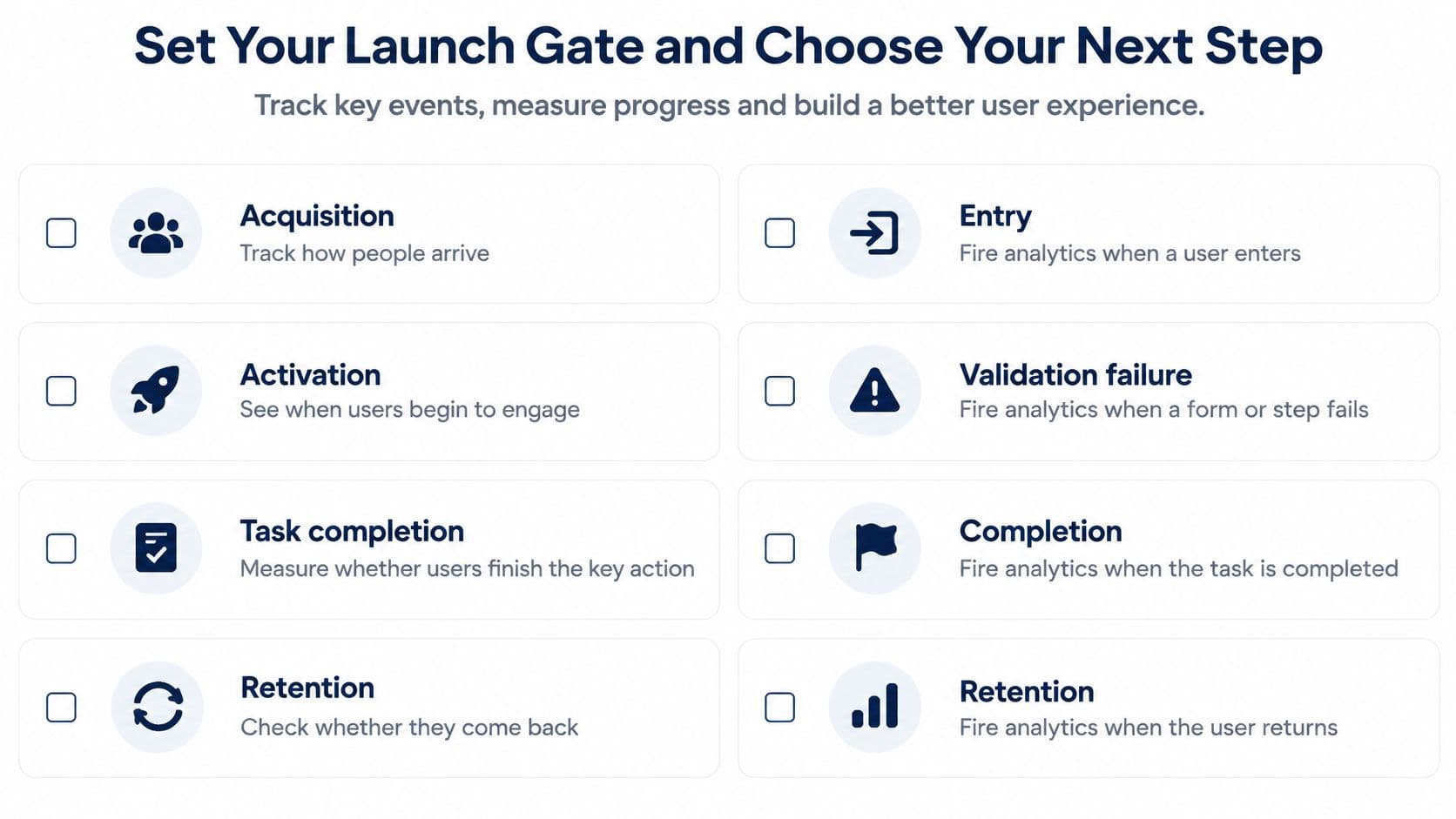
Measurement decides whether your launch produces evidence or anecdotes. Build a dashboard that separates acquisition, activation, task completion and retention rather than reporting page views. The Department for Business and Trade evaluation and performance analysis strategy supports defining performance, accessibility and product analytics as acceptance criteria from the first beta increment. Page views tell you people arrived. They say nothing about whether anyone succeeded.
Fire analytics events for entry, validation failure, completion, abandonment and error state on every critical journey. Validation failures deserve special attention. If users repeatedly fail on one field, your form is wrong, not your users. Agree thresholds in advance for completion rate, page latency, error rate and support volume, and write down what happens if you miss each one.
Release behind feature flags so you can expose new behaviour to a slice of users and switch it off without a redeploy. Roll out in increments and keep a tested rollback route. Monitor logs, uptime, real-user performance and funnel drop-off together, because a completion dip and a latency spike on the same afternoon are usually one problem, not two.
The Launch Gate in Order
- Private beta defects closed: Every defect that blocked the core journey is fixed or explicitly accepted in writing.
- Accessibility audit passed: The audit completed at private beta has no unresolved failures on critical journeys before public launch.
- Data fields mapped: Every collected field has a stated purpose, retention period and access rule.
- Thresholds written down: Completion, latency, error and support targets are agreed, with named owners.
- Monitoring and rollback tested: You've performed a rollback in staging, not just documented one.
The pitfalls at this stage are predictable. Teams measure vanity traffic instead of behaviour. They ship inaccessible custom controls because a design looked cleaner without native elements. They omit consent and data-governance decisions until a customer asks awkward questions. They trust synthetic performance scores from a lab test while real users on mid-range Android phones wait. Each pitfall has the same root cause. The team treated launch criteria as post-launch polish.
Timelines keep this honest. Most of our app projects take 8 to 16 weeks to reach a functional MVP, depending on complexity and feature requirements, and custom web applications typically take 3 to 6 months. We build for clients who are launching an MVP or scaling a platform, so the gate matters either way. It's what tells you which of those two situations you're in.
Your Next Step
Write down your riskiest assumptions and a fixed scope on one page. If you can't, that's your first task, before any design or code. Then open a discovery conversation with a development partner and bring that page with you. You can review our web development services to see how the work is structured, then contact our team to talk through your scope, your thresholds and your launch gate before committing to a build.
Common Questions About Web MVPs
An MVP earns its place by reducing uncertainty. Treat it as evidence for the next funding or build decision, not as a smaller version of the finished product. These answers focus on what to preserve, what to learn and when to choose a different product format.
Can MVP Code Be Reused When the Product Scales
Yes, when the code keeps business rules separate from the interface. The back end, data model and integrations can often carry into a larger product, even if the front end needs a redesign. For a booking MVP, availability rules and payment integration may remain useful while the screens change to serve a broader audience.
Reuse depends on structure, not on how quickly the first version was built. When business logic is tangled into page templates, changing the interface can create risk and rework. Keep the core rules and integrations distinct, and the first release can support the next decision without forcing the final product's full feature set into the MVP.
What Should Happen If Users Don't Come Back
Low retention is evidence to investigate. First, check whether users completed the core journey. If they could not finish it, adding features will not address the underlying problem. Then assess whether the need is frequent or occasional. A document-signing tool could see strong first use but few repeat visits because signing is a monthly task. That pattern may call for a change to the proposition, audience or pricing, not a larger feature list.
Use MVP validation methods to test which explanation fits before committing to the next build. Instrument the core journey in the first release, so retention and completion can inform the decision. Set privacy and accessibility requirements at the same time, rather than treating them as later additions.
Should the MVP Be a Website or an App
Start with a responsive web product unless the core value depends on a specific device capability. A web product is available through a link, avoids app store approval and is easier to change when evidence points to a pivot. That makes it a practical way to test whether a marketplace has buyers and sellers before building a separate app.
Choose a native app when the central task depends on features such as offline access, push-driven daily habits or camera-heavy workflows. The trade-off is a larger build and ongoing maintenance commitment. Let repeat behaviour and the product's actual needs justify that commitment. The first release should answer whether the idea works, not imitate every part of a mature product.
If you're scoping a web MVP, define the riskiest assumptions, prototype the core journey and set a measurable launch gate before committing to the next build. Visit Arch to start a discovery conversation about your product, thresholds and next decision.