



Website Development and Maintenance Explained for UK Teams.
A practical guide to website development and maintenance, covering lifecycles, service models, security, costs and how to choose the right UK partner.

Website Development and Maintenance Explained for UK Teams.
A campaign is live, the paid traffic is arriving, and the marketing lead gets a message: the contact form has stopped working. The site launched cleanly, but a plugin update, an untested integration or a small change has broken a customer journey. The build was treated as the project; nobody had clearly owned what came next.
Key takeaways
- Launch begins the operating phase. Build choices determine how safely and easily teams can update the site later.
- Maintenance is a business control, not just a support cost. Security, accessibility, privacy, performance and recovery all need named owners and repeatable processes.
- Choose a service model around your actual needs. A fixed project, ongoing retainer and managed hosting cover different responsibilities and risks.
- Measure what users experience. Mobile usability and real-user performance matter alongside uptime and desktop testing.
- Make recovery testable. A backup is only useful if the team can restore it and knows who is responsible.
What Website Development and Maintenance Really Means
The campaign problem is rarely just a broken form. It can reveal a wider gap: the team knows who built the site, but not who checks integrations, tests updates or restores the service if something goes wrong. A website may look finished at launch, yet the business still depends on it working reliably as content, software and customer needs change.
Website development is the work of defining, designing and building the digital product. Website maintenance is the ongoing work that keeps it secure, usable, accurate and aligned with the business. They're two parts of one investment, with launch acting as a handover, not a finish line.
That distinction changes how a project should be planned. A custom feature that has no documentation may be quick to deliver but awkward to support. A third-party integration can speed up launch, while adding a supplier and failure point the team must monitor. A content management system (CMS) may make everyday edits easier, but still needs a clear update and testing process.
Practical rule: Before approving a feature, ask who will own it after launch, how it will be tested and what happens if it fails.
For a local service business, even the basics deserve deliberate planning: the service pages, enquiry route, mobile layout and content editing process all need to work together. A guide to a salesperson website for cleaners can help a team think through what a focused service-business site needs to communicate.
The long-term cost and risk often sit in the decisions made after launch: updating dependencies, reviewing access, keeping content correct and checking that customer journeys still work. The build determines whether those jobs are routine or require specialist intervention every time. Good website development and maintenance therefore starts with a practical question: what must the site keep doing for the business, and who will make sure it does?
The Website Development Lifecycle From Brief to Launch
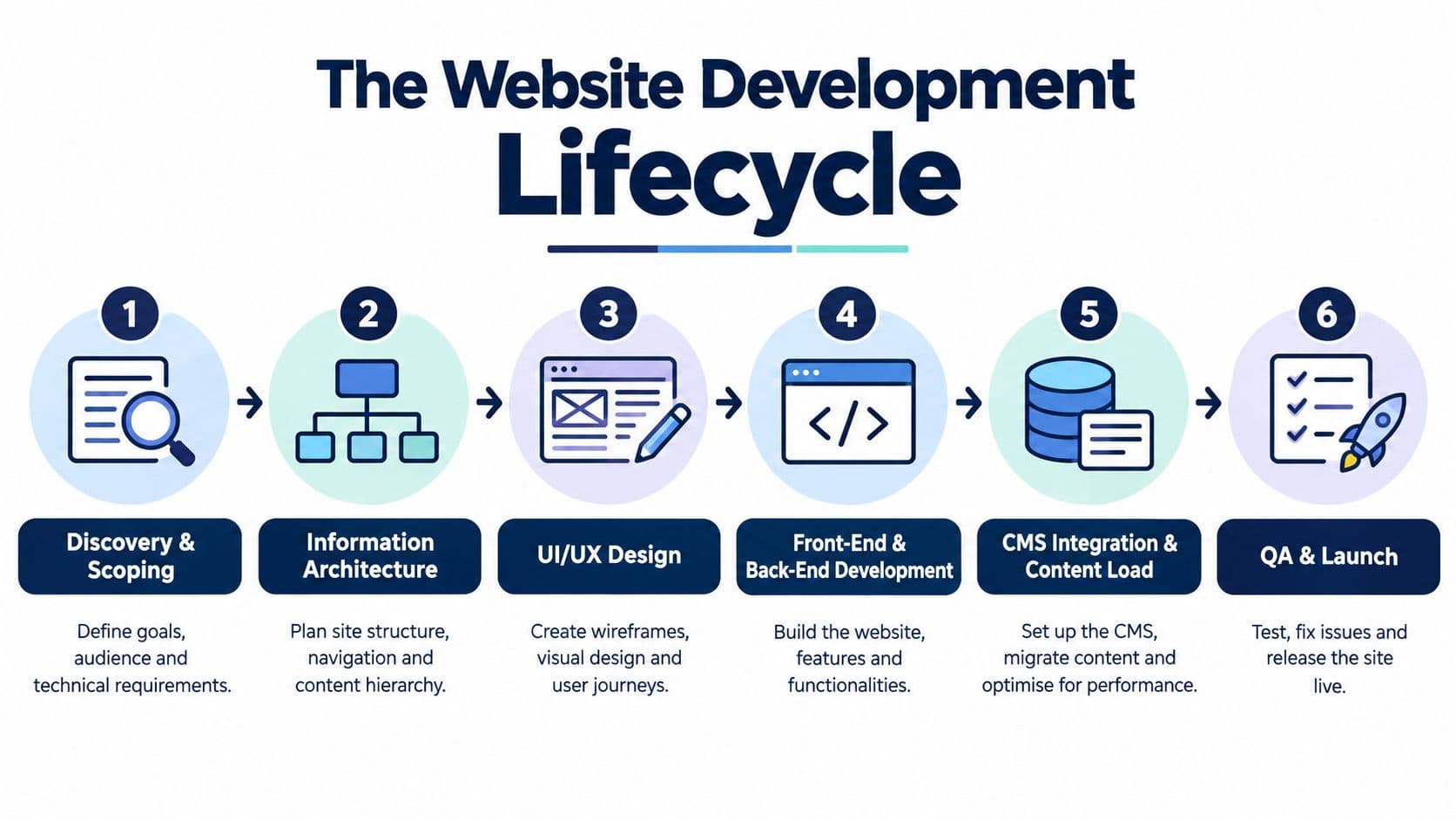
A dependable build moves through connected decisions. Each stage produces an artefact the client team can review, so assumptions are exposed before they become expensive changes.
Discovery and information architecture
Discovery and scoping establishes the business problem, audience, success criteria, technical constraints and stakeholders. Its main output is a brief that makes priorities explicit. If the team hasn't agreed what the site needs to do, design and development will fill the gaps with assumptions.
Information architecture organises pages and user journeys into a sitemap. It clarifies how people will find information and where actions such as requesting a quote or signing in belong. For teams thinking beyond the initial build, a web development roadmap can provide a useful structure for planning future capabilities.
Design, engineering and launch
UI/UX design turns the sitemap into wireframes, then visual designs and a component library. The library gives developers reusable patterns for buttons, forms and page layouts, and gives the client a coherent way to review how the product behaves.
Front-end and back-end development translates those designs into a working codebase. The front end handles what visitors see and interact with; the back end supports data, business logic and integrations. CMS integration and content load then connect the editable parts of the site and populate them with reviewed copy and media.
Quality assurance (QA) checks the site across devices, browsers, forms, links, accessibility and key journeys. A test report should record what was checked, what failed and what was resolved. The team should also review the site in staging, a separate environment for testing, before production launch. Teams that structure content for answer engines may find their step-by-step AEO method useful when planning how information should be organised and surfaced.
The schedule depends on decisions, not just coding. A contained site with agreed content and straightforward integrations may move as a focused sprint; a complex platform with multiple stakeholders, custom workflows or unresolved requirements needs a longer programme. Discovery is where the team finds out which kind of project it is.
Project Retainer and Managed Hosting Service Models
There isn't one correct way to buy web work. The right arrangement depends on the site's role, the client team's technical capacity and who should carry responsibility when something needs attention.
Fixed-scope project
A project contract defines deliverables, schedule and price for a specific build. It works well when the organisation can make decisions promptly and has someone ready to take ownership after handover. Scope control makes the initial commitment easier to understand, but requests outside the agreed work can require a change in scope. A project may also leave the client responsible for updates, monitoring and incident response unless those are separately arranged.
Ongoing retainer
A retainer reserves an agreed amount of ongoing support for changes, optimisation and advice. It can give a team faster access to people familiar with its site, but clarity matters: does the arrangement include development, emergency response, content changes or only technical support? Ask how unused capacity is treated and how urgent work is prioritised. Otherwise, the monthly fee can feel predictable while the actual scope remains unclear.
Managed hosting
Managed hosting typically puts infrastructure operations with a provider, such as hosting, patching, backups and monitoring. The exact boundary varies. It doesn't necessarily include new features, content work or responsibility for every third-party service. Buyers should establish which party responds to incidents, what the provider monitors and what evidence it supplies.
A hybrid arrangement can fit a maturing site: commission a defined build, move into a retainer for ongoing changes, and add managed hosting when the organisation wants a provider to operate the underlying environment. The trade-off is a need for clear boundaries across contracts.
Model | Best understood as | Question to settle |
|---|---|---|
Project | Defined build and handover | Who owns support afterwards? |
Retainer | Reserved ongoing capacity | Who owns support afterwards? |
Managed hosting | Infrastructure operations | Which responsibilities remain with the client? |
Compare providers on scope, speed, cost predictability and accountability. A lower initial commitment isn't necessarily a lower total burden if internal teams must then absorb work they can't support.
The Four Buckets of Day-to-Day Maintenance Work
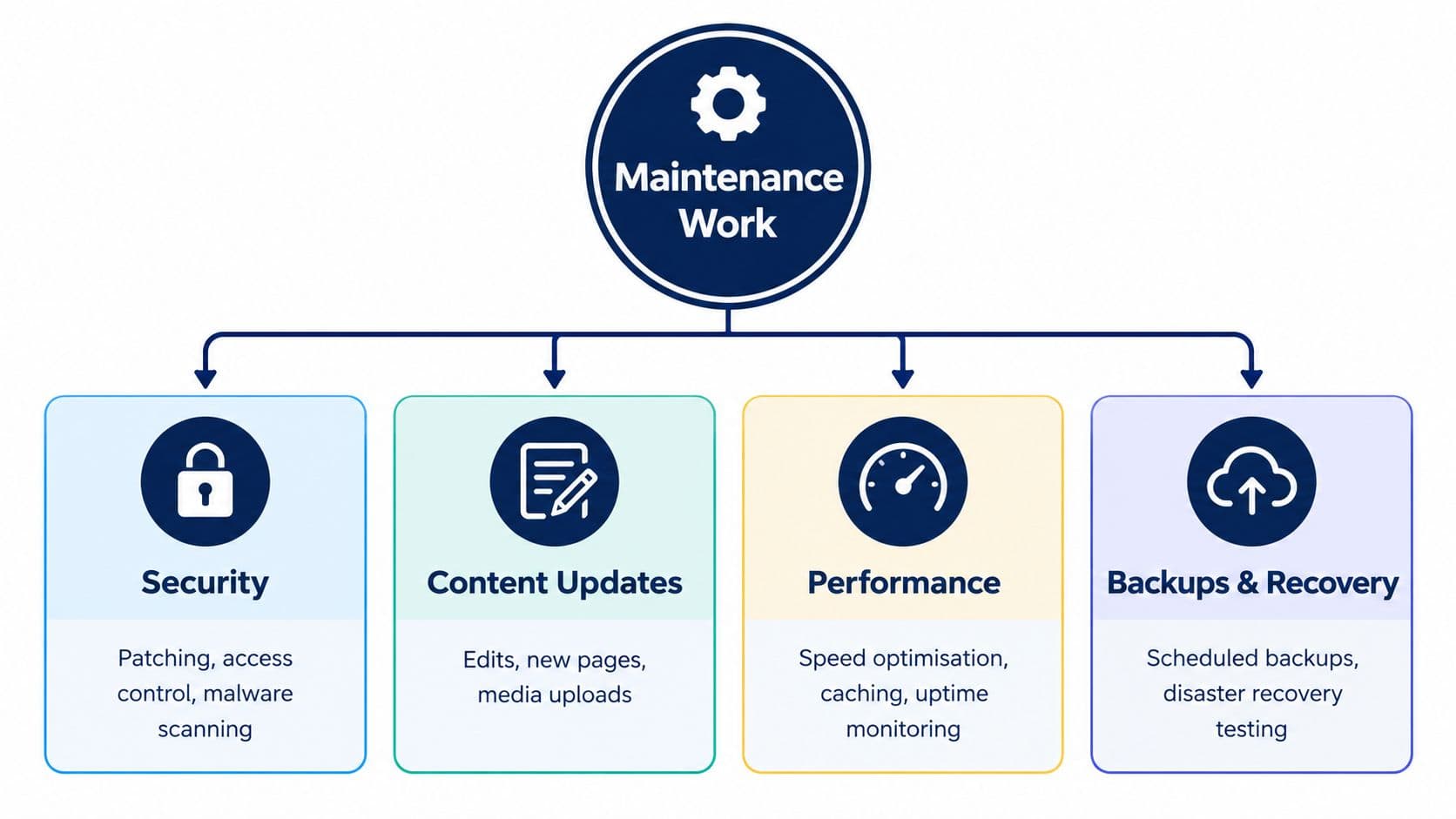
A support contract is easier to manage when it describes the work, not just the hours. Organise it around four areas, then assign an owner and a cadence that reflects how critical the site is.
Security and updates
Security covers software patching, access control, malware checks and incident response. The technical owner should track security notices and prioritise fixes according to the exposure and importance of the affected component. Admin access should be limited to people who need it, and reviewed when responsibilities change.
The business risk isn't abstract. The UK Government's 2025 Cyber Security Breaches Survey found 43% of businesses, approximately 612,000 organisations, experienced a breach or attack in the previous 12 months, with phishing accounting for 85% of incidents among affected businesses. That makes patching, account security and recovery planning part of operational resilience, not a background technical chore.
Updates include the CMS core, plugins, libraries and content. A site owner can manage approved copy changes; a developer or technical partner should assess software upgrades, test compatibility and check important journeys afterwards. Applying updates without testing can break the very functions they're meant to protect.
Performance and recovery
Performance means monitoring real user experience and addressing slow or unstable pages. The team can review image sizes, scripts, caching and database health, then check the result on the devices people use. Marketing and product teams should flag when a new tag, video or campaign page changes performance.
Backups and recovery need an agreed schedule, off-site storage and a person responsible for restoration. The right cadence depends on how often the site changes and what the organisation could afford to lose. Keep recovery instructions accessible to the people who may need them during an incident.
Backups aren't the safety net until someone has proved the site can be restored.
The practical failure in many maintenance arrangements is unclear ownership. A supplier may assume the client handles content and access, while the client assumes those tasks are included. Name the owner for each bucket, agree how issues are reported and keep evidence of completed checks.
Why UK Compliance Makes Maintenance Non-Negotiable
A UK organisation can't treat a published accessibility statement or cookie banner as proof that the site remains compliant. Rules apply to how services work in practice, and the underlying site changes as content, code and third-party tools change.
Accessibility is ongoing work
The Government Digital Service monitored 1,203 public-sector websites and 21 mobile apps between January 2022 and September 2024. Its accessibility monitoring report identified 29,787 accessibility issues. Organisations fixed 16,482 issues, or 55.3%, while 3,693, or 12.4%, remained unresolved on retest; the reported compliance rate was 70%, up from 59%.
The result is a clear maintenance lesson: test, remediate and retest after launch. A new component, document or form can create barriers even if the original design was carefully reviewed. Public-sector rules include defined content exemptions, but teams still need to consider whether users require an accessible alternative to complete a service. The GOV.UK accessibility guidance sets out exemptions and the need to assess content in context. For a practical design foundation, teams can also use inclusive design principles.
Privacy and cyber accountability
Under PECR, websites generally need to explain the use and purpose of cookies or similar technologies and obtain consent before storing or accessing information on a user's device. Consent must be freely given, specific, informed and expressed through clear positive action. The ICO describes limited exceptions for technologies that are strictly necessary for a requested service or solely transmit communications, but says cross-site or cross-device tracking and online advertising require consent. These rules affect analytics and marketing choices, so teams should review consent behaviour whenever those tools change.
Cyber governance also has a people problem. The 2025 survey reported that 27% of businesses had a board member responsible for cyber security, down from 38% in 2021. Maintenance processes can help close the gap, but they can't replace an accountable business owner. A defensible approach records who approves changes, who reviews suppliers and who acts when a vulnerability or data issue appears.
SLAs KPIs and What Maintenance Actually Costs
“Support included” isn't a useful service definition. A contract should specify what the provider measures, when it responds and what happens if a target is missed. Otherwise, the client may discover during an incident that both sides had different expectations.
Write service expectations into the agreement
Set service-level agreements (SLAs) by severity. A checkout failure or compromised admin account needs a different response from a minor copy issue. Define response times separately from resolution times, since a provider may acknowledge a problem quickly while needing longer to diagnose or fix it.
Agree on the operational details as well:
- Uptime and monitoring: State what's monitored, how alerts are handled and how availability is reported.
- Patching windows: Define how the team handles urgent security updates and routine maintenance.
- Recovery objectives: Agree how much data loss is tolerable and how quickly the site should be restored.
- Reporting: Request a concise record of incidents, changes, risks and completed work.
- Mobile performance: Track important journeys and page experience on mobile as well as desktop.
That last point matters in the UK. Ofcom's Online Nation 2024 report found smartphones represented 75% of adults' daily online time, around 3 hours 15 minutes of a 4 hour 20 minute average, and 17% of UK adult internet users went online exclusively via smartphone. A desktop-only check can miss the experience many visitors get.
Compare pricing by responsibility
Common pricing structures include a monthly retainer, a block of hours, per-ticket support or a service fee tied to the scope of the work. The right comparison isn't just the headline price. Check whether it covers testing, emergency response, reporting, content changes, hosting and supplier coordination. Complexity, integrations and risk all affect the work required, so vague package labels don't tell you what you're buying.
Before signing, ask who owns each platform component, what counts as an emergency, how work is prioritised and how the provider demonstrates that recovery works. Arch's hosting and support overview can help frame the distinction between infrastructure support and ongoing product work.
Choosing the Right Development and Maintenance Partner
A good partner makes responsibility visible. Compare an agency, freelancer or in-house hire against the same practical criteria, then decide which combination fits the site's importance and your team's capacity.
Use a scorecard, not a sales presentation
Ask each candidate for evidence of relevant sector experience, platform knowledge, security practices, accessibility process and a commercial model you can understand. A polished portfolio matters less if the provider can't explain how it tests changes or handles an incident.
Ask direct questions:
- Dependencies: Can you provide an inventory of plugins, services, scripts and APIs the site relies on?
- Recovery: Can you demonstrate a successful restore, and explain who would perform it?
- Patching: What is the documented process for reviewing and applying updates?
- Incidents: Who responds, how is the client notified and where are decisions recorded?
- Ownership: Who on our side approves releases and accepts operational responsibility?
The UK Government's 2025 cyber survey found only 27% of businesses had a board member responsible for cyber security. That governance gap is a reason for clients to name their own maintenance owner, not delegate accountability to an agency. Even a capable partner can't make business decisions on the client's behalf.
Red flags include no written patching cadence, unclear access ownership, no incident-response process or a refusal to explain what the contract excludes. For a team comparing delivery approaches, Arch's development service describes its web development offer, while its work with Edinburgh Council, H2O IQ and Cultaholic gives examples of its web projects. Judge any provider by the fit between its capabilities and your actual operating needs.
Treating Your Website as a Product Not a Project
A website launch creates a working product, not a completed business outcome. The team still needs a roadmap, an owner and a budget for the changes that keep the site useful as services, audiences and technology evolve.
The operating model can be straightforward: assign owners for security, updates, performance and recovery; choose whether project work, a retainer or managed hosting covers each responsibility; then review compliance and customer journeys as part of routine operations. Keep the supplier register and dependency inventory current, especially when analytics, payments or authentication rely on external services.
Mobile-first expectations will continue to shape what good maintenance looks like. Ofcom's figures, covered earlier, make it clear that teams need to test the site beyond desktop. Automation can help flag accessibility defects or unusual performance changes, and AI-assisted tools may support routine checks, but a person still needs to assess the impact and decide what to fix. Automation identifies signals; it doesn't assign accountability.
For teams exploring how search workflows may change, The SEO Agent offers context on AI-related SEO tools. Whatever tools you adopt, the useful next step is operational: write down who owns the website, what gets checked, how quickly failures are handled and how restoration is verified. That turns maintenance from an invisible cost into a record of how the organisation protects a product customers rely on.
Frequently Asked Questions
What does website maintenance include?
Website maintenance usually covers security patching, CMS and dependency updates, content changes, performance checks, accessibility testing, backups and recovery planning. The exact scope depends on how the site works and how critical it is to the business. Ask a provider to name the tasks, owners and reporting included rather than relying on a broad promise of support. Maintenance should also include testing key journeys after changes, especially forms, payments and account access.
How often should a website be maintained?
There's no single cadence for every site. Security alerts and critical fixes need attention when they arise; routine updates should be planned and tested; content, performance and accessibility need regular review. A site with frequent transactions or customer updates may need closer monitoring than a static information site. Set a schedule based on risk, change frequency and the consequences of downtime, then revisit it when the product or its dependencies change.
Can a business maintain its own website?
Yes, if the team has the time, access and technical skills to handle the agreed work. Staff can often manage content and review analytics, while developers handle software updates, testing and incidents. A hybrid model can work well, but only when responsibilities are explicit. Before keeping maintenance in-house, confirm who can apply patches, check integrations, monitor alerts and restore the service if an update or security event causes a failure.
What should a website maintenance contract include?
A clear contract defines scope, response expectations, escalation routes, patching, monitoring, backup and recovery responsibilities, reporting and exclusions. It should distinguish between acknowledging an issue and resolving it, and explain how urgent work is prioritised. Ask who owns third-party services and whether the provider tests restores or merely takes backups. The agreement should also identify a client-side owner who can approve changes and make decisions during an incident.
Why does mobile performance belong in maintenance?
A site can look correct on a desktop while forms, navigation or page speed fail on a phone. That can interrupt enquiries, purchases and access to important information. Maintenance teams should test real user journeys on mobile layouts and review field performance, not rely only on a desktop browser or laboratory score. As content and integrations change, they should check whether those additions make pages harder to use on smaller screens.
Is a cookie banner enough for PECR compliance?
Not by itself. Websites generally need to explain what cookies or similar technologies do and why they're used, and obtain valid consent before storing or accessing information on a user's device, unless a limited exception applies. Consent must involve clear positive action and be informed and specific. Teams should review the behaviour of analytics and advertising tools as well as the banner's wording, particularly when adding or changing third-party scripts.
About the Author
Hamish Kerry is the Marketing Manager at Arch, where he's spent the past six years shaping how digital products are positioned, launched, and understood. With over eight years in the tech industry, Hamish brings a deep understanding of accessible design and user-centred development, always with a focus on delivering real impact to end users. His interests span AI, app and web development, and the potential of emerging technologies. When he's not strategising the next big campaign, he's keeping a close eye on how tech can drive meaningful change.
Hamish's LinkedIn profile
Arch designs and builds websites, software and digital products, and provides hosting and support for teams planning beyond launch. Visit Arch to discuss your website's build, maintenance responsibilities and next steps.