



Top 10 Apps for Construction Industry in 2026.
Explore the best apps for construction industry. Our 2026 guide covers project management, safety, & BIM tools to boost efficiency.
Top 10 Apps for Construction Industry in 2026.
Construction is a major part of the UK economy, but site productivity has improved slowly for years. That is one reason construction apps now sit much closer to core operations than to admin support.
The buying decision turns on whether the software fits how information moves through a project, and the longest feature list matters less. Drawings, RFIs, inspections, handover records, commercial data, safety checks and model coordination all break down in different places. A platform that works well for a tier-one contractor managing a common data environment can be a poor fit for a specialist subcontractor that needs fast field capture and low training overhead.
That is why this guide treats the market as a set of choices. It covers established platforms, specialist tools and the point at which off-the-shelf software stops matching the job. For firms reviewing their wider built environment technology approach, the hard part is usually choosing a system your teams are likely to use on site, under pressure, with patchy signal, gloves on, and no patience for duplicate entry.
When off-the-shelf tools stop matching how your sites share information, a web platform built around your own process is the other route, and it is the kind of build we take on.
Key takeaways
- Construction apps are now core operating tools: UK firms are investing heavily in digital tools, and the strongest results come from an app that fits the workflow, not from the biggest suite available.
- There isn’t one “best” platform for everyone: Main contractors, specialist subcontractors, developers, consultants and SMEs all need different balances of document control, field usability, cost control and BIM depth.
- BIM and field execution should connect: A disconnected stack creates duplicate admin, delayed decisions and avoidable rework.
- Off-the-shelf works best when your process is already standardised: If your teams run similar projects repeatedly, a mature platform can be the quickest route.
- Custom apps make sense when your workflow is your advantage: That’s often true for compliance-heavy, multi-party or operationally unusual businesses.
- Mobile UX matters more than feature count on site: If operatives can’t use it with gloves on, weak signal, poor lighting or time pressure, adoption drops fast.
- Selection should focus on process fit: Before comparing logos, map who captures information, who approves it, where data lives and what has to happen offline.
Most buyers make the same early mistake. They compare apps as feature lists, although the decision is architectural. Are you trying to create a common data environment, digitise site forms, tighten commercial control, improve QA, or tie BIM, safety and delivery into one operating model?
That’s why a good shortlist starts with business friction, not branding. If you need a useful framework before choosing anything, this guide on how to evaluate software is worth reading alongside platform demos.
What follows is a practical look at where each platform fits, where it doesn’t, and when a custom product is the better answer.
1. Autodesk Construction Cloud (Build, BIM Collaborate Pro, Takeoff)
Autodesk Construction Cloud is strongest when BIM is the spine of project delivery instead of a side activity. If your design teams already live in Revit, Civil 3D or adjacent Autodesk tools, ACC reduces the friction between model coordination, issue management, document control and takeoff.
This is one of the few platforms where the logic of the suite is clear once implementation settles. Build handles RFIs, submittals, issues, site diaries and photos. BIM Collaborate Pro supports model coordination and cloud worksharing. Docs acts as the common data environment. Takeoff extends that into 2D and 3D quantification.
Where Autodesk fits best
UK adoption of BIM-related apps and software stands at approximately 70% among surveyed professionals, with nearly half using BIM on most of their projects and 23% using it across all projects, according to the buildingSMART-related market summary published here. That matters because Autodesk tends to pay off most when the model is operationally active, not just produced for compliance.
For teams in the built environment sector, ACC is usually a good fit when these conditions apply:
- Model-led coordination matters: Design clashes, package reviews and approval workflows need to happen against live federated information.
- You want one governed environment: Document revisions, permissions and transmittals need tighter control than consumer file-sharing can offer.
- Takeoff sits close to design data: Estimators benefit when quantity work isn’t detached from evolving models.
Practical rule: Don’t buy Autodesk Construction Cloud just because your designers use Autodesk authoring tools. Buy it when delivery teams will also work inside the environment.
The main drawback is complexity. Product naming, module overlap and legacy BIM 360 language still confuse buyers. It also needs disciplined onboarding. When teams skip that, ACC can become a powerful repository that site teams barely touch.
2. Procore
Procore is usually the platform I point to when a contractor needs one operating system for delivery, commercial control and field reporting, rather than a collection of disconnected apps. Drawings, RFIs, submittals, inspections, observations, change events and cost workflows sit in the same environment, which reduces the handoff problems that appear when each team works in a different tool.
That consistency matters more than feature breadth alone.
Procore’s main value is standardisation across projects. Regional teams can run the same approval paths, site reporting routines and information flows without reinventing the process job by job. For contractors trying to tighten governance across a growing portfolio, that consistency often delivers more value than buying the deepest specialist product in each category.
Where Procore fits best
In practice, Procore tends to suit main contractors and larger subcontractors that want operational discipline across multiple live projects. It is especially effective where project teams need site and office staff working from the same record, with less chasing across email, PDFs and spreadsheets. That can also support broader goals such as waste reduction and better reporting on programmes focused on mobile tools supporting greener construction practices.
Good-fit scenarios usually include:
- Standardising project delivery: Leadership wants a repeatable way to run RFIs, quality checks, progress records and commercial workflows.
- Mixed office and site teams: Project managers, quantity surveyors and site managers need shared visibility instead of parallel admin.
- Multi-party projects: Permissions, directories and controlled collaboration are strong enough for complex supply chains.
- Mobile use on active sites: Field teams can usually pick up the app quickly, which improves adoption compared with heavier enterprise systems.
The trade-off is straightforward. Procore is broad, but breadth brings setup work, permissions planning and process design. If a business has not agreed how it wants projects to run, the software will expose that weakness rather than solve it.
Smaller firms often feel this first. They buy a major platform, then realise their actual need was simpler drawing control, snagging or field inspections. In that case, a lighter off-the-shelf tool, or a custom workflow built around the exact reporting process, can be a better commercial decision.
Choose Procore when process consistency across projects is the goal. Skip it when the requirement is narrow, localised and unlikely to justify platform overhead.
Pricing is another factor. It is typically quote-based, and the total cost is easier to justify when several departments will use it. If only the site team logs in while commercial and design coordination stay elsewhere, return on investment gets harder to defend.
3. Oracle Aconex
Oracle Aconex remains a serious choice for large, complex, multi-party programmes where formal process matters as much as speed. It has a long reputation in infrastructure, major developments and heavily governed environments where correspondence, transmittals and audit trails can’t be loose.
Aconex does not try to feel lightweight, and that is deliberate. It’s built for structured workflows and accountable communication between many organisations that may not fully trust one another.
Best for formal information control
If your project environment includes client teams, consultants, contractors, specialist subcontractors and strict governance requirements, Aconex often fits better than a more casual collaboration platform. Its neutral data model and formal document control approach are especially useful when records may later be scrutinised in claims, disputes or regulated reviews.
Typical good-fit scenarios include:
- Mega-project governance: Infrastructure and complex developments with large stakeholder groups.
- Formal correspondence controls: Teams need traceable, controlled exchanges rather than chat-style collaboration.
- Enterprise integration: Aconex can sit alongside broader Oracle construction and engineering workflows.
The trade-off is obvious. SMEs and fast-moving delivery teams can find it over-specified. If your main pain point is field adoption, Aconex may solve control while leaving the frontline under-served.
That’s the recurring theme across apps for construction industry buyers. A strong CDE doesn’t automatically create strong field behaviour. If your supervisors still revert to WhatsApp, email and paper notes, your governance layer may be intact while execution remains fragmented.
4. Asite
Asite is one of the more credible UK-centric options if your priority is controlled information management without abandoning practical field workflows. It combines common data environment capabilities with forms, inspections, snagging and model viewing in a way that makes sense for public-sector, regulated and governance-heavy projects.
Its appeal is practical. It aligns well with UK procurement, approvals and information governance expectations.
Where Asite makes sense
If your organisation cares about metadata discipline, document approval routes and role-specific visibility, Asite is usually worth a serious look. That’s particularly true when the business wants a UK-founded platform with local market familiarity rather than a broadly global suite that happens to sell into construction.
The strengths tend to be:
- Governed document control: Approvals, workflows and structured information handling are central.
- Field capability without losing control: Site teams can log inspections, forms and issues without leaving the wider controlled environment.
- Public-sector comfort: Buyers with compliance-heavy delivery models often find Asite familiar.
The downside is that casual users can find the UI deeper than they expect. That’s common for platforms built around governance, and it means implementation needs user-role design instead of a blanket rollout.
A simple test helps here. Ask whether the people opening the app daily are document controllers, project managers, site managers or operatives. If one system has to serve all four groups, configuration matters as much as platform choice.
5. Trimble Viewpoint for Projects (plus Field View)
Trimble Viewpoint for Projects and Field View make more sense together than apart. Viewpoint for Projects handles revision-controlled documents, workflows, mark-ups and transmittals. Field View brings digital forms, snagging, inspections, permits and H&S processes onto site.
For UK contractors, that pairing is familiar territory. It covers one of the most common operational gaps in construction tech. Office teams want controlled information and site teams want simple field capture, and few platforms bridge that split cleanly.
A strong UK contractor stack
This combination is particularly effective for businesses that already think in terms of process templates. If your projects rely on standard forms, repeatable inspections and strong revision control, the platform can create useful consistency.
Sustainability and compliance data are becoming part of delivery workflows rather than separate reporting exercises, and that matters more now. That’s why the connection between field tools and broader digital delivery matters, especially in areas such as sustainable construction and green mobile workflows.
What it does well:
- Document revision discipline: Teams can control what’s current and what’s superseded.
- Structured field capture: Site inspections and permits become easier to standardise.
- Ecosystem value: The Trimble environment can be helpful if you already use adjacent tools.
What it doesn’t do especially well is feel unified if you only adopt one half. Some businesses buy the document side and leave field processes under-digitised, or vice versa. Then they wonder why the stack feels fragmented. In practice, this is a paired solution.
6. Causeway (CausewayOne)
Causeway is a UK construction operating suite more than a single mobile app. If your commercial controls, estimating, tendering and project accounting are the heart of the problem, Causeway is often more relevant than a field-first platform.
Many app roundups undersell commercial software because it isn’t visually exciting. But for contractors, cost visibility often decides whether digital investment pays back at all.
Strong where UK commercial workflows matter
Causeway fits businesses that need software aligned to UK standards and contract administration realities, including JCT and NEC workflows. It’s especially relevant when commercial managers, estimators and finance teams need better operational continuity than spreadsheet-based processes can provide.
Good-fit use cases include:
- Estimating and tender workflows: Pre-construction teams want tighter digital handover into delivery.
- Project accounting: Financial control is construction-specific, not generic ERP bolted onto projects.
- Commercial governance: Contract forms and valuation processes need to reflect UK norms.
The caution is simple. This is a suite that usually needs considered implementation. If a business only wants site inspections or drawing mark-ups, Causeway is probably broader than necessary. If a business loses margin through weak commercial control, though, a narrower site app won’t fix the root problem.
That’s often where custom software enters the conversation. Some firms keep a commercial core like Causeway and build a bespoke mobile layer around site capture, client reporting or operational exceptions.
7. LetsBuild (Aproplan + GenieBelt)
LetsBuild is one of the more pragmatic choices for firms that want site digitisation without buying a large enterprise platform. Aproplan handles site diaries, checklists, forms, snagging and photos. GenieBelt focuses more on programme tracking and communication.
That split gives SMEs and mid-sized contractors something useful. You can improve field discipline and visibility without redesigning the whole business around a heavyweight suite.
Why smaller teams often like it
The rollout burden is lighter than on enterprise systems. Core paid users can work inside the platform while collaborators are invited in as needed. That makes the product easier to introduce on projects where digital maturity varies by package or trade.
It tends to work well when:
- You need visible site progress: Teams want cleaner reporting and fewer ad hoc updates.
- Quality and snagging are pain points: Site staff need quick capture, not elaborate configuration.
- Planning communication is uneven: Short-term coordination needs a shared reference point.
Its limits are equally clear. Financials, analytics and deeper enterprise controls aren’t the main story here. If board-level reporting, integrated commercial control or owner-side workflow governance matter heavily, LetsBuild can feel too narrow.
The right app for site teams may not suit the whole business. That’s why project-level usability and company-level architecture should be judged separately.
8. Fieldwire by Hilti
Fieldwire does one thing well. It helps site teams work from plans, tasks and punch items without dragging them into a bloated project platform. For subcontractors and general contractors that need plan-centric execution, that focus is an advantage.
This is one of the more field-friendly apps for construction industry use cases where speed matters more than system depth. Sheet management, mark-ups, task tracking, inspections and photos are all geared toward practical jobsite use.
Best as a field execution layer
Fieldwire is a strong choice when teams are drowning in drawing revisions, informal task assignment and scattered snag lists. It’s especially useful on projects where the business already has another commercial or document system and needs a better site execution layer.
What stands out:
- Fast mobile use: Teams can pick it up quickly.
- Good plan-centric logic: Tasks tied to locations and sheets are easier to understand on site.
- Offline support: Essential where connectivity is unreliable.
What it won’t solve is business-wide management. There’s limited native financial depth, so many firms pair it with another platform. That’s fine if done deliberately. It’s less fine when software sprawl happens by accident.
The practical question is whether Fieldwire is your primary system or your field edge. It performs better as the second.
9. OpenSpace
OpenSpace addresses a different problem from most tools on this list. It doesn’t try to be your project management platform. It creates a reliable visual record of site progress through 360° capture, mapped back to plans and BIM.
That matters because construction often suffers from subjective reporting. “Nearly done” can mean almost anything. Reality capture gives teams, clients and remote decision-makers a more objective basis for review.
Visual verification at scale
A 2025 UKGBC report summary cited in this industry market discussion noted that many scale-up contractors still lack digital tools for real-time sustainability and project data capture, while 360° reality capture apps such as Cupix gained UK adoption in early 2026. OpenSpace sits naturally in that shift toward richer site evidence, better handover records and more defensible progress tracking.
Where OpenSpace earns its place:
- Remote stakeholder review: Clients and consultants can inspect progress without constant site visits.
- QA and dispute reduction: Historical visual records help teams verify what was installed and when.
- Progress validation: Captured conditions can support milestone and sequencing reviews.
Its limitation is simple. OpenSpace is an add-on capability, not a replacement for a CDE, PM suite or commercial platform. Teams get most value when it plugs into an existing digital operating model.
10. SafetyCulture (iAuditor)
SafetyCulture is one of the easiest platforms to pilot when the goal is better inspections, audits, equipment checks and action tracking. It’s mobile-first, template-driven and clear enough for operational teams to use without weeks of process design.
That simplicity is the reason many teams start here. They need reliable inspections and follow-up actions now more than a full project operating system.
A practical safety and inspection layer
In the UK, 55% of contractors were using apps for safety and risk management by 2023, directly addressing the sector’s annual accident cost, according to the construction mobile apps overview cited here. SafetyCulture fits that market well because it’s straightforward to deploy at site level.
It’s a good option when:
- Inspection consistency is weak: Templates and structured mobile capture improve reporting quality.
- Offline use matters: Teams need to work in poor-signal areas.
- You want a low-friction pilot: Published pricing and a free tier make testing easier than with quote-led enterprise tools.
It’s less suitable as a full construction platform. If you need deep drawing workflows, commercial control or multi-party document governance, pair it with something else or explore a custom mobile app approach.
Some firms also hit edge-case friction with large photo loads or patchy connectivity, which is why specialist teams such as health and safety compliance surveyors still care about field conditions, evidence quality and reporting discipline, not just app availability.
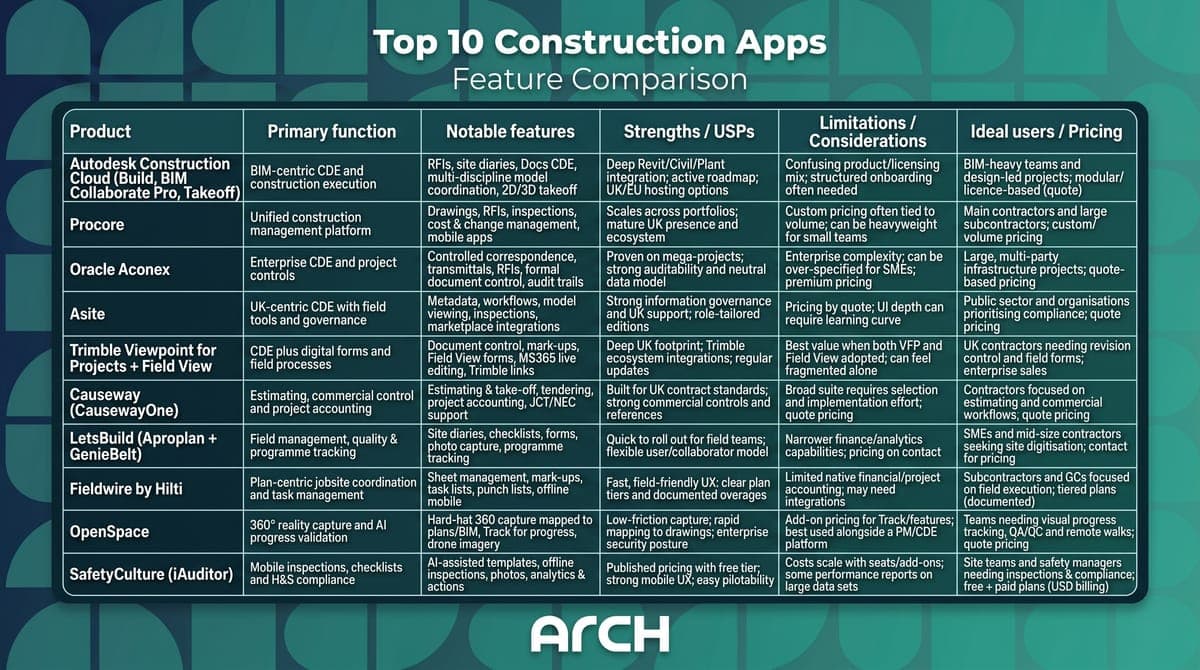
Top 10 Construction Apps, Feature Comparison
Final Thoughts
Choosing among apps for construction industry teams is no longer a search problem, because the market is crowded. The mistake is selecting software that does not match how the business delivers work.
Start with the constraint before the brand.
A document-control heavy project with strict approvals has different needs from a self-delivering contractor trying to improve site reporting, or a commercial team struggling to keep costs tied to progress on site. In practice, that means Autodesk Construction Cloud, Asite, Aconex and Trimble Viewpoint for Projects tend to suit businesses that need stronger control of information and formal workflows. Procore often fits firms that want broader process standardisation across projects. Causeway is more relevant where commercial discipline is the weak point. Fieldwire, LetsBuild and SafetyCulture usually make sense where field adoption and day-to-day site execution matter most.
Software also exposes weak operating habits very quickly. If nobody agrees who raises an issue, who owns close-out, which record is contractual, or how offline activity is synced back into the project record, the app becomes a more expensive version of the same confusion. Good construction tech forces those decisions instead of removing them.
Off-the-shelf vs custom is the real strategic choice
This is the decision many buyers leave too late.
Off-the-shelf products are usually the better starting point when the workflow is common, the team needs a proven system quickly, and the business does not gain much from doing that process in a distinctive way. That covers a large share of contractors. They need reliability, vendor support, known implementation patterns, and a product their supply chain has probably seen before.
Custom software becomes more credible when standard products create repeated friction that affects margin, compliance, or adoption. I usually see that in four situations:
- The workflow is unusually specific. Complex approvals, specialist compliance steps, or client-specific reporting can become awkward workarounds inside a general platform.
- The business already runs several core systems. A custom layer can connect field capture, approvals, and reporting without forcing a full rip-and-replace programme.
- Frontline adoption is weak. A simpler tool built around one role or one task often gets better use than a broad platform packed with functions nobody on site wants to learn.
- The company is trying to protect a real operational advantage. Better client reporting, tighter labour coordination, or faster issue resolution can justify software shaped around that edge.
The UK market makes that trade-off even sharper. Many construction firms are small or mid-sized businesses with limited implementation capacity, mixed digital maturity, and teams working in poor signal conditions. They often need a toolset that fits site reality, local compliance, and existing habits better than they need a large enterprise suite. As noted earlier, the sector is dominated by SMEs, which is why right-sized deployment matters as much as feature depth.
A practical way to choose
Start by identifying the decision that currently slows the job down or introduces avoidable risk. Then identify who feels that friction first. Site managers, commercial leads, design coordinators, safety teams, and clients usually experience different failures in the same process.
Next, decide whether you need a system of record or just a better workflow around one broken handoff. That distinction saves a lot of money. Some firms do need a platform decision. Others need to connect inspections to defects, RFIs to site teams, or field activity to commercial reporting without replacing everything else.
The best outcome is rarely the biggest platform. It comes from the clearest fit between your operating model, your reporting obligations, and what people on site are likely to use every day.
FAQs
Which app is best for a small construction company in the UK?
For a small company, the best app is usually the one people will use every day. Fieldwire, LetsBuild and SafetyCulture are often easier starting points than enterprise suites because rollout is lighter and field teams can adopt them quickly. If commercial control is the bigger issue, Causeway may be more relevant. Small firms should avoid buying a broad platform before mapping their pain points.
Are BIM apps worth it for contractors who don’t design buildings?
Yes, if the model is used in delivery rather than just handed over as a design artefact. BIM apps become worthwhile when site teams, project managers and coordinators can use model information to reduce rework, improve issue tracking and connect field decisions to design intent. If the model stays in the design office, the value drops sharply. The return comes from operational use, not model ownership alone.
Should we use one construction platform or multiple specialist apps?
It depends on your process maturity. One platform is easier to govern, train and report from, especially in larger organisations. Multiple specialist tools can work well when each solves a specific problem better than an all-in-one suite. The risk is fragmentation. If you choose a multi-tool stack, define the system of record for documents, costs, inspections and approvals so teams don’t duplicate effort.
What’s the biggest mistake construction firms make when choosing apps?
They buy based on feature breadth instead of workflow fit. A platform can look excellent in a demo and still fail on site because the mobile experience is poor, approvals are too complex or information has to be entered twice. Another common mistake is ignoring change management. Construction tech works when process, training and accountability are designed alongside the software, not left until after procurement.
When should a construction business consider building a custom app?
A custom app makes sense when off-the-shelf products force awkward workarounds, especially around compliance, field reporting, client visibility or multi-system integration. It’s also useful when your teams only need a focused workflow instead of a full suite. The strongest custom projects usually sit beside existing systems, filling a gap cleanly, rather than trying to rebuild every capability a mature construction platform already has.
How important is offline capability in construction apps?
It’s critical. Construction work doesn’t happen under ideal signal conditions, and poor connectivity can kill adoption fast. If supervisors or operatives can’t trust an app to capture information reliably, they’ll revert to notes, calls and photos outside the system. Any serious shortlist should test offline behaviour in real site conditions, especially for inspections, snagging, safety checks, drawing access and media-heavy workflows.
If you’re weighing up off-the-shelf platforms against a bespoke product, Arch can help you make that decision properly. Arch designs and builds mobile apps, software, websites and AI products for organisations that need something practical, scalable and well-executed. If you want to explore a construction workflow, prototype a field tool, or connect an existing software stack with a better user experience, get in touch through Arch’s contact page. You can also see how Arch approaches digital product delivery in projects like Boiler Juice, Findr, Deploy, My Pension ID and Adapt Well.
About the Author
Hamish Kerry is the Marketing Manager at Arch, where he has spent the past six years shaping how digital products are positioned, launched, and understood. He has over eight years in the tech industry and a deep understanding of accessible design and user-centred development, with a focus on delivering real impact to end users. His interests include AI, app and web development, and the potential of emerging technologies. Outside campaigns, he keeps a close eye on how tech can drive meaningful change.