



Phishing Resistant MFA: The UK Enterprise Roadmap.
A practical UK guide to phishing resistant MFA — what it is, how FIDO2 beats SMS and push, and how to roll it out across your organisation.
Phishing Resistant MFA: The UK Enterprise Roadmap.
Key takeaways
- SMS codes, voice codes, email links, and push approvals are not phishing resistant. They can still be captured through adversary-in-the-middle phishing.
- Phishing-resistant MFA means the credential is cryptographically bound to the actual site, so a fake login page can't reuse what it steals.
- FIDO2 security keys, platform passkeys, cloud-synced passkeys, and smartcards/PKI are the main options worth evaluating.
- Microsoft's research found MFA reduced compromise risk by 99.22% overall and 98.56% even after credentials were leaked, with 99.99% of MFA-enabled accounts remaining secure during the study period.
- The UK move toward FIDO2-compliant, phishing-resistant MFA is already policy-relevant, so this is a now problem, not a someday problem.
- Roll out in phases. Start with IT, finance, and privileged access, then widen to the workforce with clean recovery and support design.
- Some low-risk internal apps do not need the strongest control on day one, but admin, finance, customer-data, and remote-access paths absolutely do.
Basic MFA still loses to modern phishing kits. SMS codes, voice prompts, email magic links, and even some push flows can be relayed in real time, which is why the right question for a UK CTO is no longer whether to use MFA, but which MFA resists phishing by design. The National Cyber Security Centre's 2023 shift toward FIDO2-compliant, phishing-resistant MFA made that distinction unavoidable for public-sector security thinking, and it should shape every private-sector identity refresh too.
What Phishing Resistant MFA Actually Means
Phishing resistant MFA is not just “stronger MFA”. It is authentication where the secret does not behave like a reusable code that a phisher can copy and replay. The core property is cryptographic binding to the website origin, so the authenticator proves it is talking to the genuine service, not a lookalike page.
That's why the old ways fail. A one-time passcode or push approval still asks the user to hand over or confirm something on a page that might be fake. A phishing-resistant method, by contrast, is more like a signature that only works on the genuine document, not on a photocopy.
The UK direction of travel is already clear. In 2023, the National Cyber Security Centre moved public-sector guidance away from SMS and voice codes and toward FIDO2-compliant, phishing-resistant MFA as the preferred secure-by-default approach, a shift from “better than passwords” to resists phishing by design. That fits the broader move to passkeys and passwordless authentication across enterprise environments, as noted in the earlier UK security guidance on implementing Zero Trust in China for organisations that need to harden access paths rather than merely add another prompt.
Practical rule: if the user can type or approve a reusable secret into a fake login page, it is not phishing resistant.
The most useful way to think about it is simple. The authenticator must know the origin of the service, and the service must verify a private key that stays on the device. NIST's definition is explicit that phishing resistance depends on cryptographic authentication rather than manual entry of OTPs, which is why SMS, voice codes, email magic links, and push-approve prompts do not meet the bar.
If you want a parallel example of this “secure the relying party first” mindset, the control pattern used in UK product security for open banking security follows the same logic. The fix is not more user vigilance, it's removing the attacker's ability to replay the secret.
How Modern Phishing Beats Basic MFA
An adversary-in-the-middle kit does not need to defeat MFA in a dramatic way. It just needs to stand between the user and the actual site long enough to copy what the user entered. The attacker sends a lure, the victim opens a fake sign-in page, and the proxy relays everything to the genuine service in real time.
That relay is what breaks traditional MFA. If the user enters an SMS code, approves a push, or clicks a magic link, the proxy captures the response and forwards it before it expires. The user sees a normal sign-in. The attacker gets a live session.
Why vigilance is not enough
The core problem is structural. A careful user can spot a bad spelling mistake, but they cannot see the proxy sitting between the browser and the service they are trying to reach. Once the page is convincing enough, the user follows the normal login path and the attacker gets the credential or the session token.
That is why “our staff are trained” is not a defence by itself. Training helps, but training does not stop replay. If the mechanism relies on a user approving a prompt on a page that may be fake, the attacker has already won the important part of the exchange.
When the browser or authenticator checks the origin, the attack falls apart. The phishing proxy does not have the matching key for the genuine site, so the cryptographic ceremony fails. The user can still be tricked into loading the page, but the credential cannot be reused on the actual service.
NIST's standard is blunt: phishing-resistant authentication uses asymmetric-key cryptography, not a manually entered OTP, and it binds the authenticator to the genuine service.
That distinction matters because it changes the attacker's economics. SMS and push flows can be relayed. Origin-bound FIDO2 and WebAuthn flows cannot be replayed in the same way, because the secret does not become a portable token in the first place. For a CTO, that is the difference between a control that slows attackers down and a control that closes the common account-takeover path.
Comparing the Main Authenticators
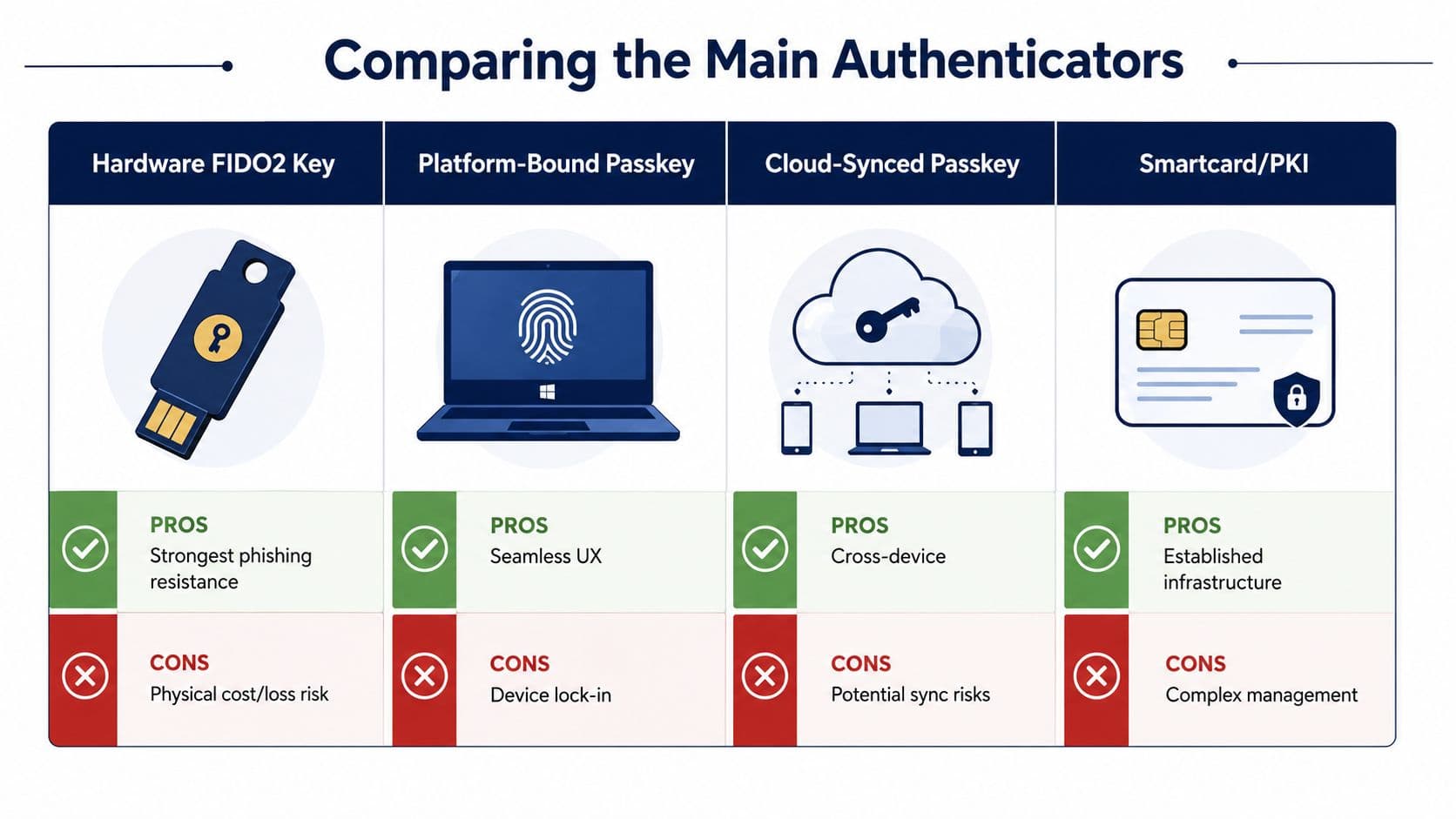
The market is full of noisy claims, so the useful comparison is plain. UK teams usually end up choosing among hardware FIDO2 security keys, platform-bound passkeys, cloud-synced passkeys, and smartcards or PKI. Each works, but each breaks in a different place.
Hardware FIDO2 security keys
These are the strongest straight-line option when you want a tangible token with very little ambiguity. They are phishing resistant by design, because the cryptographic ceremony is bound to the origin, and they work well for administrators, finance users, and anyone with remote access to sensitive systems. The trade-off is simple, there is physical cost, and people lose keys.
Platform-bound passkeys
These are the cleanest user experience when the employee stays on one managed device. They feel effortless because the private key lives on the laptop or phone and is accessed with biometrics or a PIN. The downside is device lock-in, so you need a solid recovery story for people who replace or wipe devices.
Cloud-synced passkeys
These are the easiest to spread across devices, which is why they matter for general workforce adoption. They improve convenience and reduce the “I left my key at home” problem. The trade-off is that you need to think harder about sync trust, device provenance, and recovery boundaries, especially in regulated teams.
Smartcards and PKI
These still make sense where the organisation already has deep certificate infrastructure and formal identity processes. They are established, familiar, and highly controlled. The cost is management overhead, because card lifecycle, issuance, revocation, and support are more complex than most organizations want for broad rollout.
Salesforce's 2026 enforcement notice is the right warning sign here, because major SaaS providers are moving tenants toward security keys and cloud-synced passkeys only. That tells you where the ecosystem is going. It also tells you not to waste time defending legacy comfort methods that don't survive a modern phishing proxy.
Bottom line: SMS, voice, email magic links, and basic push are still useful stopgaps in some journeys, but they are not phishing resistant.
The Business Case in Hard Numbers
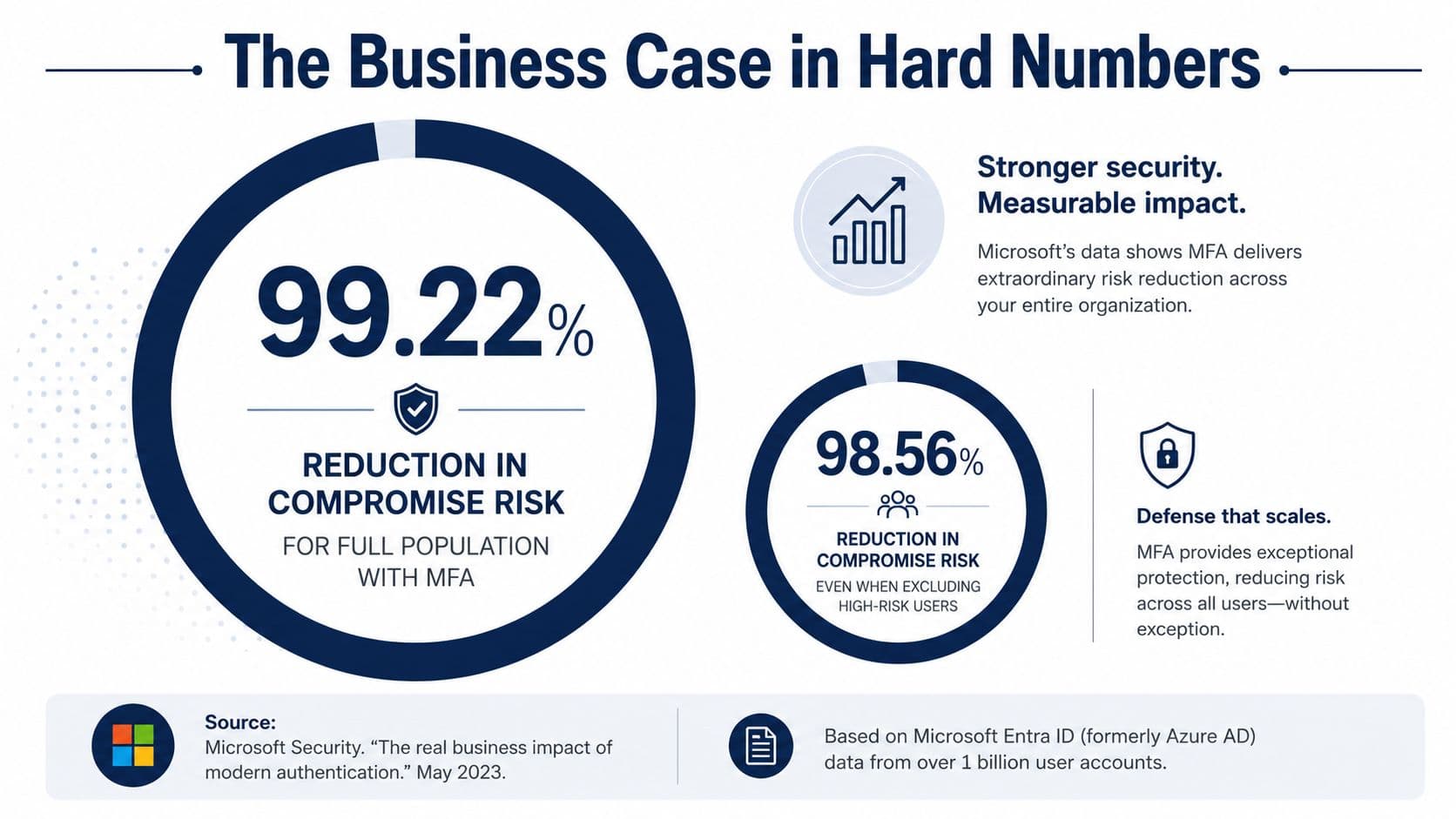
Microsoft's research gives the board-level answer in one sentence. MFA reduced compromise risk by 99.22% across the full population and by 98.56% even when credentials had already been leaked, while 99.99% of MFA-enabled accounts remained secure during the study period. Those are not abstract security vanity metrics, they are evidence that strong authentication changes the odds in a way attackers feel immediately.
The commercial signal is just as clear. Microsoft also reported that 92% of employee productivity accounts used phishing-resistant MFA in one initiative, which tells you peers are moving fast when the environment matters. If your competitors are hardening their identity layer and you are still relying on codes that can be relayed, you are carrying avoidable risk.
What the board actually buys
A board does not buy “FIDO2”. It buys fewer successful account takeovers, fewer incident-response hours, less operational disruption, and a better position with customers, auditors, and insurers. The strongest argument is not that phishing-resistant MFA sounds modern, it is that it removes the attacker's easiest route into privileged accounts and remote logins.
This is also where the NCSC's 2023 stance matters. The UK moved policy relevance toward FIDO2-compliant, phishing-resistant MFA because the threat changed, not because the industry wanted a shiny upgrade. That makes the control part of a wider security baseline, not an optional enhancement.
For finance leaders, the logic is straightforward. A single compromised admin or finance account can trigger far more pain than the price of a key or passkey rollout. You do not need a forecast spreadsheet to know that repeated incident handling, recovery work, and customer reassurance cost more than getting the control right earlier.
CFO rule of thumb: spend on the identity control before you spend on the incident.
The right budget frame is therefore not hardware versus software. It is cheap authentication versus expensive recovery. Once you express the choice that way, the case for phishing-resistant MFA stops sounding theoretical and starts sounding like basic risk control.
A Practical UK Rollout Roadmap
Start with inventory and risk tiering. List every identity path, then separate admin, finance, customer-data, remote-access, contractor, and low-risk internal app users. If you do not know which flows are most exposed, you will end up overprotecting the easy stuff and underprotecting the accounts attackers want.
Phase one, pilot with people who feel the pain first
Pilot with IT and finance. Those teams already understand breakage risk, support overhead, and the cost of account compromise, so they are the fastest way to expose bad assumptions. Use the pilot to test registration, browser support, mobile behaviour, and recovery before anyone else is asked to depend on it.
Phase two, enforce on privileged roles
Move administrators and other high-risk accounts to the Conditional Access “Phishing-resistant MFA strength” pattern used in Microsoft Entra. Microsoft's implementation guidance is clear that enforcement should cover directory roles and resources, while emergency access or break-glass accounts should be excluded from the primary policy so you can recover during lockout scenarios. That is the kind of detail that separates a secure rollout from a self-inflicted outage.
Phase three, broaden to the workforce and customer journeys
Once privileged access is stable, widen the control to the general workforce, then to customer-facing flows where the risk justifies it. Not every internal application needs the strongest control on day one, but admin, finance, customer-data, and remote-access paths do. Shared, kiosk, and contractor accounts need explicit handling, because they often sit outside the neat passkey story and force you to decide whether the account model itself needs redesign.
Enrolment UX matters more than most security teams admit. If registration is clumsy, users delay setup or create support tickets, and that slows the rollout. Keep the first-login flow short, make recovery visible, and validate device compatibility across browsers, mobile platforms, MDM posture, and endpoint tooling before you turn the policy on.
For teams already thinking about resilience and fallback, the operational logic is similar to the planning in disaster recovery. You do not want the backup path to become the weakest path.
Capture the rollout artefacts as you go, not after the fact. Policy text, exception register, break-glass ownership, user communication, and formal sign-off should exist before broad enforcement. If it is not documented, it will not survive audit, and it will not survive staff turnover either.
UX, Recovery and Support Reality Check
Phishing-resistant MFA creates friction in places vendors prefer not to discuss. Users lose security keys. People swap devices. Contractors arrive with unmanaged kit. Accessibility needs vary, and a single rigid method does not suit every workforce or every customer journey.
Where the support burden really lands
The helpdesk pays for weak design. If your recovery process requires a human to improvise every time someone loses a key, your rollout will feel expensive even if the control itself is sound. Build a clean reissuance and verification path up front, and you will cut most of the frustration before it reaches support.
Accessibility deserves the same treatment. Not every user can rely on a phone, a laptop camera, or a specific biometric flow, so the authentication policy must allow supported alternatives without weakening the whole estate. That is especially true in mixed-device environments where browser support, MDM posture, and endpoint controls vary by team.
The blunt truth is that phishing-resistant MFA is overkill for some low-risk internal apps and mandatory for others. A blanket rule sounds neat in a policy document, but the real world is messier. Treat the highest-risk paths as mandatory, then let the lower-risk areas use a proportionate control model if the threat profile allows it.
Good policy is selective. If every journey gets the same control, your exceptions will become the real policy.
That is the balance UK product, engineering, and IT leaders need to strike. The question is not whether the method is fashionable, it is which devices, browsers, and recovery journeys it has to survive in your own environment. Get those details right, and adoption starts to feel like a system, not a punishment.
Evaluating Vendors and Building the Business Case
Buy the design, not just the token. A vendor-neutral scorecard should start with protocol depth. If an identity provider or token supplier cannot support FIDO2, WebAuthn, or PKI cleanly, it is not ready for a serious UK deployment.
What to ask before you sign
Look at platform coverage across managed Windows, macOS, iOS, Android, and browser combinations. Check the recovery and reissuance flow, because that is where most “secure” products become operationally awkward. Review audit logs, SIEM integration, and MDM alignment so your security team can see who enrolled, who recovered, and who was exempted.
Supply chain matters too. If tokens are involved, you want provenance, lifecycle control, and clear replacement handling, not a vague promise that the devices are safe. The same is true for service integration, because the control only helps if it works across identity, endpoint, and monitoring layers without creating a support tangle.
If your organisation wants help turning that policy into a working product, the useful route is discovery and delivery together. The same logic applies whether the interface is phone-first or web-first, and the wrong split between in-house and external work can slow the whole programme, as discussed in outsourcing versus in-house delivery.
Here is the scorecard I would use:
- Protocol support: FIDO2, WebAuthn, PKI, and clear origin-bound behaviour.
- Recovery design: safe reissuance, verified fallback, and break-glass handling.
- Operational visibility: usable audit logs, SIEM export, and support traceability.
- Device fit: browsers, mobile platforms, MDM, and endpoint controls tested in your estate.
- Supply-chain assurance: token provenance, replacement process, and lifecycle governance.
If a vendor cannot answer those cleanly, keep looking. The product is only half the story, the integration and change management are where phishing-resistant MFA succeeds or fails.
If you want a blunt assessment of your current identity stack and a rollout plan that won't break operations, talk to Arch. They can help you turn a policy into a working product, with the discovery, design, and delivery discipline needed to make phishing-resistant MFA stick in practice.
FAQ
Is phishing resistant MFA worth it if we already have MFA everywhere
Yes, if your current MFA still relies on SMS, voice calls, email links, or push approvals. Those methods add friction for attackers, but they do not stop adversary-in-the-middle phishing. Phishing-resistant MFA is worth it for admin, finance, remote access, and customer-data paths first, because those are the accounts that create the biggest blast radius when they fail.
What should we roll out first in a UK organisation
Start with privileged users, IT, and finance. That gives you the clearest signal on support load, registration flow, device compatibility, and recovery. Then extend to remote access and any path that touches sensitive customer or workforce data. Do not begin with a broad, company-wide mandate if you have not already tested fallback and break-glass handling.
Are passkeys enough on their own
Passkeys are the most usable phishing-resistant option for many organisations, but they are not a design substitute. You still need policy, recovery, device support, and audit logging. In some environments, hardware security keys or PKI will be better for controlled access, while passkeys are better for broad adoption. The right answer depends on the risk tier and the device estate.
When is phishing resistant MFA overkill
It can be overkill for low-risk internal apps where the user has limited access and the data sensitivity is low. That does not mean those apps need weak security, only that the strongest control may not be the best first move. Use proportionate policy. Reserve the strictest methods for admin, finance, customer-data, and remote-access pathways.
What breaks most rollouts
Recovery design breaks most rollouts. If users lose a key and the reissuance path is slow or confusing, support tickets spike and adoption stalls. The second biggest failure is poor compatibility testing across browsers, mobile devices, and MDM/endpoint policies. Security teams often buy the control first and only then discover the operational gaps.
How do we know if our current methods are not phishing resistant
If the user can type or approve a code on a page that might be fake, it is not phishing resistant. SMS, voice, email magic links, and basic push do not meet that standard. The key test is whether the authenticator is bound to the genuine site origin through asymmetric cryptography. If it is not, a phishing proxy can still intercept the flow.