



Data Migration Strategies a Practical Guide for 2026.
Explore essential data migration strategies. This guide covers big-bang vs phased, risk mitigation, governance, and tooling for UK businesses.
Data Migration Strategies a Practical Guide for 2026.
Key Takeaways
- Data migration is a business change programme, not a database exercise. The strongest strategies are built around continuity, governance, user impact and rollback as well as moving records.
- Big bang, phased and parallel approaches each solve different problems. The right choice depends on downtime tolerance, data sensitivity, operational complexity and team capability.
- In UK regulated environments, continuity usually outweighs speed. Guidance notes that phased or parallel approaches are often used where downtime is operationally expensive, and phased migrations may run for months or years while legacy systems stay live and data is validated in the target environment (Databricks on data migration).
- Data quality work decides outcomes early. Profiling, cleansing, source-to-target mapping and transformation rules prevent avoidable failures later in the programme.
- Testing has to be operational, not symbolic. Record counts, checksums, reconciliation, user acceptance testing and rollback planning are what make a cutover credible.
- Compliance should shape the migration design. For UK personal data, lawful transfer controls, encryption in transit, least-privilege access and documented assessments should sit alongside technical planning.
- The business case often rests on risk reduction. In the UK, migration is often justified by compliance, resilience and reducing dependence on fragile legacy estates, with immediate payback a lesser factor.
Legacy systems rarely fail all at once. They slow teams down first. Slow response times are a common first sign, and a guide to performance monitoring shows how to watch for them after a move.
A product roadmap gets trimmed because integrations are awkward. Reporting takes too long because data lives in too many places. Engineers become custodians of old workarounds instead of building what the business needs. At that point, data migration is a strategic decision about how the organisation intends to operate next.
For many CTOs and Heads of Product, that moment brings real pressure. The decision goes beyond choosing a tool or scheduling a cutover weekend: it settles how much risk the business can carry, how much disruption users can tolerate, and whether the target platform is likely to remove today's bottlenecks instead of recreating them somewhere else. The same questions show up when organisations launch new platforms, replace a core SaaS tool, or rebuild customer-facing products through modern web development services.
The practical challenge is that most advice on data migration strategies is too generic. It tells teams to plan carefully, back up data and test thoroughly, which is true but incomplete. It doesn't help enough with the trade-offs that matter in the boardroom and the delivery team at the same time. Should you move everything at once or in waves? Should you keep systems running in parallel? When is lift-and-shift sensible, and when does it just postpone a larger problem?
Once the data has moved, the target database often needs tuning, which our article on speeding up a slow database covers in more detail.
Introduction
A CTO signs off a platform change to fix reporting delays, reduce support overhead, or meet a compliance deadline. The migration then becomes the point where strategy meets operational risk. If the approach is wrong, the business pays twice: once in delivery cost, and again in disruption, rework, or avoidable exposure to audit and security issues.
That is why data migration should be treated as a business decision first. UK teams often have to balance delivery speed against service continuity, procurement constraints, retention rules, and accountability for personal data throughout the move. A fast cutover can reduce the cost of running two systems, but it also concentrates risk. A slower phased approach can lower operational shock, but it extends complexity, governance effort, and vendor spend.
The practical question is how to move data and what the organisation is willing to trade to get there.
What leaders are really deciding
A strong migration plan answers commercial and operational questions before technical ones.
- Continuity first: How much downtime can the business absorb without customer, operational or reputational harm?
- Risk ownership: Who signs off the move, who validates the data, and who has authority to halt or roll back?
- Target state clarity: Are you moving data into a better operating model, or just recreating the old one on newer infrastructure?
- Compliance posture: Will the migration process itself expose personal or sensitive data to new risks?
Teams that answer those points early make better choices about scope, sequencing, tooling, and testing. Teams that skip them often discover too late that the cheapest migration path on paper creates the highest cost in support, remediation, or lost confidence after go-live.
This applies whether the programme is a core platform replacement, a product rebuild, or a secure SharePoint migration strategy. The method matters, but the trade-offs matter more.
The Core Data Migration Strategies Explained
Most data migration strategies can be understood through a simple analogy. Moving house in a single day is one approach. Packing one room at a time while still living in the old place is another. Both can work. They create very different pressures.
Big bang and phased approaches
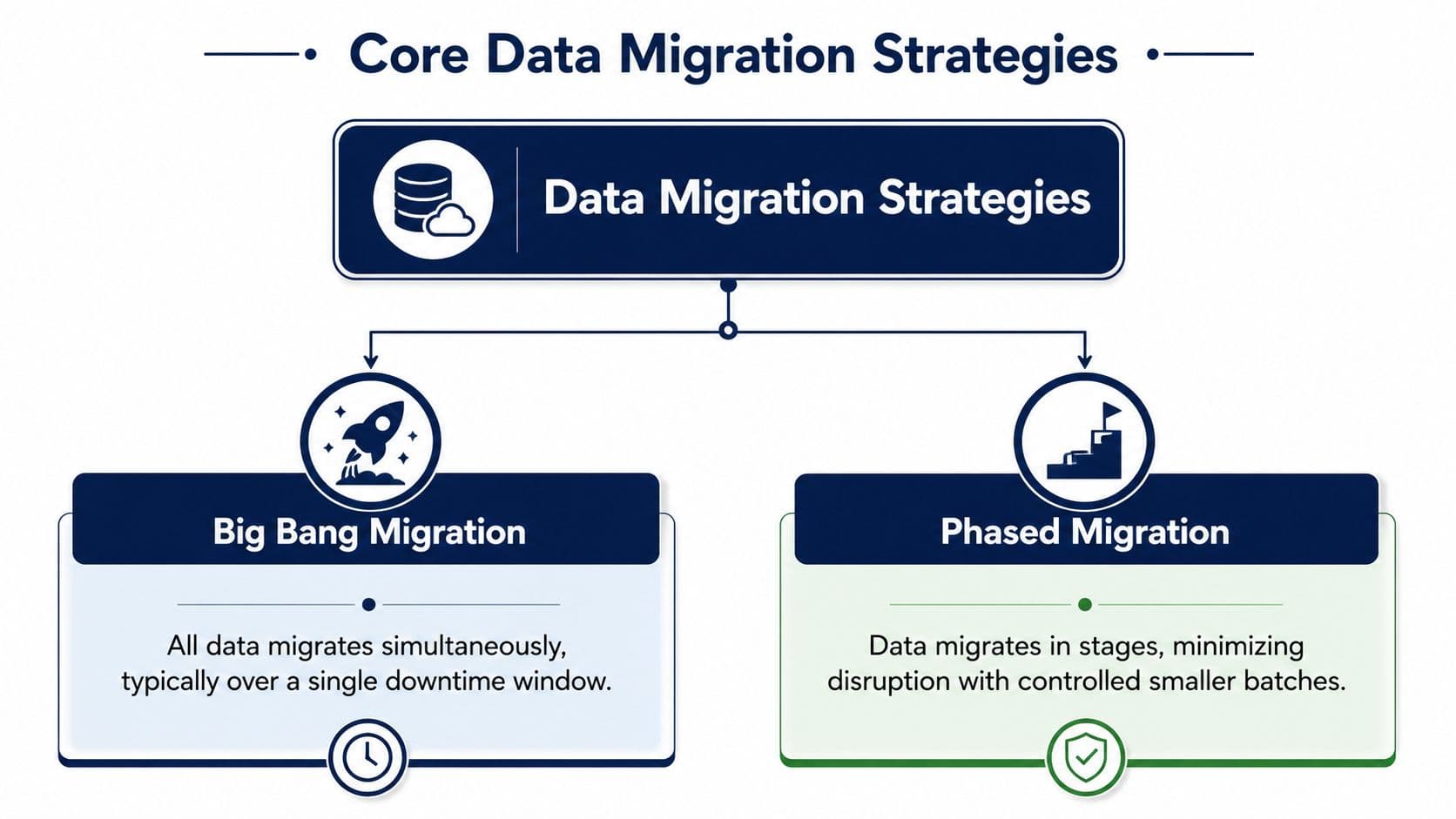
Big bang migration moves everything in one concentrated event. Teams extract, transform and load the full dataset, switch users to the new system, then retire the old environment. It's attractive when the scope is contained, dependencies are well understood, and the business can tolerate a clear cutover window.
The benefit is decisiveness. You avoid prolonged dual-running and don't spend months supporting two operating models. The downside is that if something critical breaks, the entire business feels it at once.
Phased migration moves data in controlled waves. That might mean migrating by customer segment, business function, geography, product line or historical data range. It gives teams more room to test assumptions, fix mappings and validate outputs before the next wave proceeds.
A parallel migration sits close to phased, but with a stronger emphasis on running old and new systems together while outputs are compared. That's common where continuity matters more than speed.
For teams dealing with Microsoft environments, document estates and collaboration platforms, this overview of a secure SharePoint migration strategy is a useful companion because it shows how governance and access control need to be built into the plan, not added later.
Lift-and-shift, replatforming and refactoring
The migration approach describes how you move. The migration type describes how much change you apply during the move.
- Lift-and-shift means moving data and often workloads with minimal redesign. A common example is moving a legacy application database from an ageing server to a cloud-hosted equivalent while keeping the schema and business logic largely intact.
- Replatforming keeps the core business capability but improves the underlying platform. For example, moving from a self-managed database to a managed cloud database while adjusting integrations, security controls and deployment patterns.
- Refactoring changes the application and data model more extensively. That could involve redesigning schemas, breaking out services, replacing custom processes and rewriting how data is consumed.
Practical rule: If the current data model is one of the reasons the business is stuck, lift-and-shift won't solve enough.
The mistake I see most often is treating these types as technical options when they are operating model choices. Lift-and-shift is faster to start, but can preserve old complexity. Refactoring creates more long-term value, but it increases delivery risk unless the scope is tightly controlled.
Choosing Your Migration Approach A Decision Framework
A migration decision often gets forced in the worst possible meeting. The licence renewal date is fixed, the legacy vendor wants out, product wants zero disruption, and compliance wants an audit trail for every record that moves. At that point, the question is which approach the business can fund, govern and recover from if something goes wrong, whatever sounds most modern.
For UK organisations, that usually means judging the migration method against continuity, regulatory exposure and operating cost, not just delivery speed. The critical enterprise data migration insights many teams miss have more to do with decision criteria than tooling: downtime tolerance, reversibility, accountability and the cost of running old and new environments side by side.
Questions that shape the right strategy
Start with commercial and operational limits.
- What is the cost of interruption? If an outage blocks revenue, harms customer service, or creates reporting gaps, a single cutover becomes harder to justify.
- How reversible is the move? Big bang only makes sense if rollback is credible. That means more than backups. It means clear ownership, tested restoration steps, and agreement on the point at which the business aborts.
- How much uncertainty sits in the source estate? Hidden dependencies, weak documentation and inherited custom logic increase the odds of surprises during cutover. In that situation, phased migration buys time to expose issues before they hit the whole operation.
- Can the organisation carry dual-running costs? Parallel and phased approaches reduce immediate exposure, but they add expense in support, reconciliation, training and management attention.
- Is the migration tied to a platform decision? If the programme also includes a shift in hosting, security model or integration pattern, choices around cloud vs on-premise infrastructure should shape the migration plan from the start.
A practical decision lens
Big bang fits best where the scope is contained, interdependencies are understood, and the business can tolerate a planned cutover window. It is usually cheaper to run and easier to explain, but the failure mode is concentrated. If the cutover fails, the business feels it immediately.
Phased migration suits organisations with tighter continuity requirements, multiple business units, or stronger audit expectations. It spreads risk over time and gives stakeholders more checkpoints. The trade-off is duration. A six-month migration can easily become a fifteen-month programme if each wave inherits unresolved issues from the last one.
Parallel running is the confidence-first option. It is useful where the cost of getting outputs wrong is higher than the cost of running duplicate processes for a period. I have seen it work well in regulated environments and badly in product-led businesses that underestimated the operational drag. Two live systems create two sets of support questions, two reporting paths, and frequent disputes over which record is current.
The right framework forces a choice between acceptable risks. If leaders want low downtime, low cost, low change impact and full reversibility all at once, the programme usually stalls or becomes expensive enough to undermine the business case.
Mitigating Risk Data Quality Mapping and Governance
A migration usually goes off course long before cutover. The warning signs show up in the data itself: duplicate customer records, inconsistent dates, free-text fields doing the job of structured attributes, and access rights nobody has reviewed in years.
That matters because bad data does not stay contained. It inflates migration effort, creates reporting disputes after go-live, and increases compliance exposure if personal or sensitive records move without clear ownership. For UK teams, this is often the point where a technical programme becomes a business risk programme.
.jpg&w=2048&q=75)
Profiling and cleansing before any serious move
Profiling should start early, before teams commit to scope, timelines, or tooling. If the source estate contains high volumes of broken references, conflicting identifiers, or records that no longer serve an operational purpose, the migration plan needs to reflect that reality. Otherwise, the target platform inherits old problems at a higher cost.
A sensible first pass usually covers:
- Source profiling: Identify null patterns, duplicates, invalid values, broken relationships, and records with no clear owner.
- Data classification: Separate operationally critical data from legally sensitive, obsolete, or low-value records.
- Cleansing rules: Define what gets corrected, archived, merged, excluded, or left untouched, and document why.
The trade-off is straightforward. Heavy cleansing before migration improves confidence and reduces downstream support issues, but it extends discovery and often needs business input that teams have not budgeted for. Minimal cleansing speeds up delivery, but it shifts cost into post-migration remediation, user frustration, and audit work.
For organisations handling personal data, transfer design should reflect UK GDPR obligations from the start. That includes clear access controls, encryption in transit, documented handling procedures, and evidence of who approved what moved and why. Teams running migration tooling in containerised environments should apply the same discipline to infrastructure and deployment controls, especially where jobs are orchestrated across environments using Docker-based delivery workflows.
Mapping and governance turn assumptions into decisions
Source-to-target mapping is where strategy gets tested. A field name is rarely just a field name. It often carries an old process, a policy exception, or a workaround that made sense five years ago and now conflicts with the target model.
At this stage, migration programmes either gain clarity or accumulate hidden debt.
If a legacy status does not map cleanly into the new platform, someone has to decide whether to transform it, retire it, or create a new rule around it. If historical case data no longer meets retention requirements, the right answer may be exclusion rather than migration. Those are commercial and compliance decisions as much as technical ones.
A useful supporting read on this discipline is these critical enterprise data migration insights, particularly for teams wrestling with lineage, ownership and operational accountability.
Governance needs clear answers to four questions:
- Who owns each dataset and has authority to sign off on changes?
- Who approves mapping and transformation rules when business meaning is unclear?
- Who can access source, in-flight, and migrated data during the programme?
- What evidence will satisfy internal audit, security, and compliance review?
If those answers are still vague, the programme is not ready for execution. It is still defining risk.
The Crucial Role of Testing Validation and Rollback Plans
Testing is where confident migration plans become credible migration plans.
Many teams say they've tested because scripts ran in a non-production environment. That isn't enough. A migration has to prove that the data landed correctly, the system behaves as expected under load, users can do their jobs, and the business can recover if a late defect appears after cutover.
/up
.jpg&w=2048&q=75)
What good testing actually includes
A practical UK migration strategy is often engineered as a staged cutover so the runbook can be validated in batches with record counts, checksums and post-load reconciliation before each wave proceeds. Guidance recommends that approach because hidden data-quality issues often cause transform and load defects, and incremental verification reduces the chance of a bad mapping or corrupt source record spreading across the full target dataset (EIRE Systems on staged cutover validation).
A serious testing cycle usually includes:
- Technical unit testing: Scripts, transformation jobs, API calls and exception handling.
- Integration testing: Data flows between the new platform and connected systems such as CRM, finance, analytics and authentication layers.
- Performance testing: Batch windows, query response, concurrent usage and background jobs.
- User acceptance testing: Business users validate not just field values, but whether they can complete real tasks without workarounds.
- Operational rehearsal: Teams practise the cutover sequence, communications, support process and issue triage.
If the migration touches containerised services or deployment pipelines, the surrounding delivery environment matters too. Teams modernising infrastructure alongside migration often need to tighten release consistency and portability, especially where services are packaged through Docker-based workflows.
Rollback is a design requirement
Rollback planning is ordinary professional practice.
If you can't describe the exact point at which you would reverse the migration, you don't have a rollback plan. You have a hope plan.
A proper rollback covers trigger conditions, decision-makers, technical steps, data divergence handling, communications and the cut-off point after which reversal is no longer safe. It should be tested, time-boxed and understood by both technical and business leads.
For teams under schedule pressure, rollback is often the first thing people try to weaken. That's usually a sign the programme is over-committed.
Tooling Timelines and Cost Trade-offs
Tooling should follow the migration strategy.
I've seen teams buy heavyweight platforms for relatively simple moves and, just as often, try to run critical migrations with brittle one-off scripts because they want to save upfront budget. Both are expensive mistakes. The right toolset depends on the complexity of transformation, the need for observability, the tolerance for manual intervention and the operational model after go-live.
Three tooling routes and when they fit
Enterprise ETL and orchestration platforms suit migrations with complex transformations, multiple source systems, repeatable pipelines and formal governance requirements. They make sense when the migration is part of a broader data platform change and the tooling will remain useful after cutover.
Cloud-native migration services often fit replatforming work well. They can reduce setup time, integrate cleanly with target services and provide enough automation for common transfer patterns. They're useful when the destination environment is already defined and the migration team wants managed capabilities rather than more custom code to own.
Custom scripts and lightweight utilities can be perfectly sensible for narrow, well-understood migrations. Custom code is fine; the problem is using it for high-risk estates without the surrounding logging, validation and recovery controls.
The timeline and ROI reality
Longer projects aren't automatically safer. They often accumulate parallel-run costs, duplicated support effort and organisational fatigue. At the same time, compressed plans without enough rehearsal create concentrated risk. The strategy has to balance both.
In the UK, the business case for migration is often driven by compliance or retiring legacy systems rather than immediate payback. The Central Digital and Data Office says government operates hundreds of at-risk legacy systems, while the National Cyber Security Centre has highlighted ransomware as a major threat. That changes the commercial conversation from simple ROI to reducing operational risk and dependency on fragile estates (Viewpointe on the UK legacy modernisation case).
That's why cost discussions need to include more than implementation spend:
- Dual-running cost: Supporting old and new systems at once
- Operational drag: Manual reconciliation, reporting workarounds and increased support overhead
- Security exposure: Extended reliance on outdated platforms
- Future delivery cost: How much product and engineering capacity the legacy estate continues to consume
For some organisations, the cleanest outcome is to pair migration with stronger managed infrastructure and support. That's where modern hosting and support services can matter, because the target environment needs to be stable after the move as well as available on cutover day.
Migration in Practice Examples for Different Teams
The best data migration strategies are shaped by context. The same recommendation doesn't fit an SME website rebuild, a growing SaaS platform and an enterprise estate carrying sensitive customer data.
An SME moving a website stack
A smaller business wants to move a website database and CMS to a better host because performance and maintenance are becoming painful. The schema is familiar, the integrations are limited and the business can accept a planned maintenance window. The stack Arch typically builds on is described in our backend tech stack post.
A lift-and-shift with a tightly managed cutover is often enough here. The goal is to reduce operational friction quickly, validate content and transactional data, and move on.
A scale-up replatforming its core product
A fast-growing product team has outgrown its original architecture. The data model still works, but the platform around it needs better scalability, cleaner deployment and improved reporting. Customer activity can't stop while the switch happens.
A phased replatforming tends to work better. Migrate lower-risk domains first, keep interfaces stable for users, and use each wave to refine mappings and operational playbooks. The business gets progress without betting everything on a single event.
An enterprise handling regulated customer data
An enterprise with sensitive data is replacing legacy systems across multiple business units. The challenge goes beyond technical complexity: it is controlling access, proving data integrity and deciding how long old and new environments should coexist without extending risk unnecessarily.
UK-specific planning should be anchored in data protection. The ICO reported 1,071 personal data breach reports in Q1 2025 and 2.5 times more cyber incidents reported by organisations than in the previous quarter, showing that migration windows sit inside a heightened security environment (Hakkoda on UK migration risk and breach context).
That's why some enterprises are better served by tighter, well-governed phased migrations rather than open-ended parallel runs. Keeping two estates alive for too long can increase exposure, especially where suppliers, temporary access and personal data are involved.
Frequently Asked Questions About Data Migration
How do I choose between big bang and phased migration?
Choose based on business tolerance for disruption, not personal preference. Big bang can work when the scope is narrow, the dependencies are understood and downtime is acceptable. Phased migration usually fits better when continuity matters, data is complex, or the organisation needs stronger validation between waves. The deciding factor is often operational risk. If one failed cutover would affect customers or regulated processes, phased usually deserves priority.
What usually causes migration projects to struggle?
The common pattern isn't bad tooling. It's weak preparation. Teams underestimate data quality issues, skip detailed mapping, leave ownership unclear, or treat testing as a technical exercise instead of an operational one. Problems then show up late, during cutover or after go-live, when they're much harder to contain. A migration becomes unstable when nobody has agreed what data matters most, how success is measured, and when rollback should be triggered.
How much data should we migrate?
Not all data deserves a seat on the first train. Migrate the data needed to run the target business process well, meet legal obligations and support users on day one. Archive, retire or delay low-value material if it adds cost and complexity without improving outcomes. The strongest plans separate critical, active and historical data early, then decide what needs full migration, partial migration or controlled decommissioning.
Is parallel running always the safest option?
No. Parallel running reduces some risks, but it introduces others. It can create duplicated effort, conflicting records, user confusion and a longer exposure window for sensitive data. It's useful when confidence and continuity matter more than speed, especially in regulated estates. But it should be time-boxed, governed tightly and designed with a clear exit. Parallel operation without a firm decision framework becomes expensive drift, not prudent risk management.
What does good migration testing look like?
Good testing proves more than technical success. It shows that transformed data is accurate, complete and usable in real business workflows. That means unit and integration testing, performance checks, reconciliation, record counts, checksums and user acceptance testing with realistic scenarios. It also includes rehearsal of cutover and rollback. If users can't complete key tasks after migration, passing automated tests won't matter much to the business.
When is lift-and-shift the wrong choice?
Lift-and-shift is the wrong choice when the old platform's data model, process design or governance is part of the problem you're trying to solve. It can be useful for speed, containment and short-term stabilisation. But if the organisation needs cleaner integrations, stronger controls, better reporting or a significantly improved product experience, just moving the same structure elsewhere often delays essential work and preserves old inefficiencies.
About the Author
Hamish Kerry is the Marketing Manager at Arch, where he has spent the past six years shaping how digital products are positioned, launched, and understood. He has over eight years in the tech industry and a deep understanding of accessible design and user-centred development, with a focus on delivering real impact to end users. His interests include AI, app and web development, and the potential of emerging technologies. Outside campaigns, he keeps a close eye on how tech can drive meaningful change.
Hamish's LinkedIn: Hamish Kerry on LinkedIn
If you're planning a migration as part of a wider product rebuild, platform modernisation or legacy replacement programme, Arch helps teams design and deliver digital products with the technical depth and delivery discipline needed to reduce risk and move with confidence.